FASTag Management Software That Tracks Every Toll Payment
Fleet Scanner helps transport companies manage toll expenses with smart Fleet FASTag Management Software. Track every FASTag transaction, monitor balances, and connect toll costs to the right trip automatically.
Whether your trucks are moving between Delhi and Jaipur or carrying freight from Mumbai to Kolkata, you can see every toll charge in one place and understand exactly how much each route costs.
Get Free Demo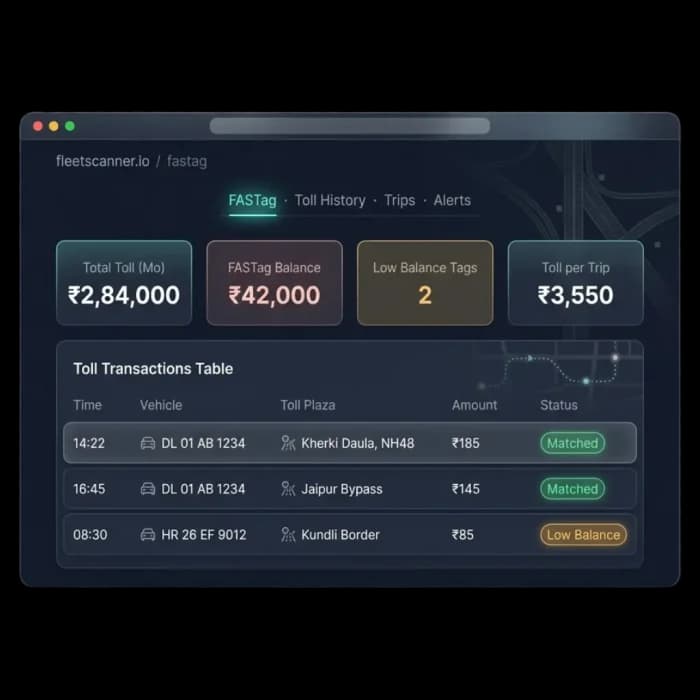
Toll costs add up faster than you think
Toll charges happen every day, but many transport companies don’t know exactly where the money is going. Without proper tracking, it becomes difficult to spot mistakes, monitor balances, or understand the true cost of a route.
Toll charges are hard to track
Hundreds of toll transactions happen every month, making it difficult to know which trip each charge belongs to.
Low balances cause delays
A low FASTag balance can slow down drivers and create delivery delays when it isn’t noticed in time.
Route costs are unclear
Without toll tracking, it’s hard to know whether a route is profitable or too expensive.
Unexpected charges go unnoticed
If a toll charge appears where the truck never traveled, it can be difficult to spot without proper monitoring.
Everything you need to manage toll expenses
Fleet Scanner’s FASTag Management Software keeps every toll payment organized and connected to your fleet operations.
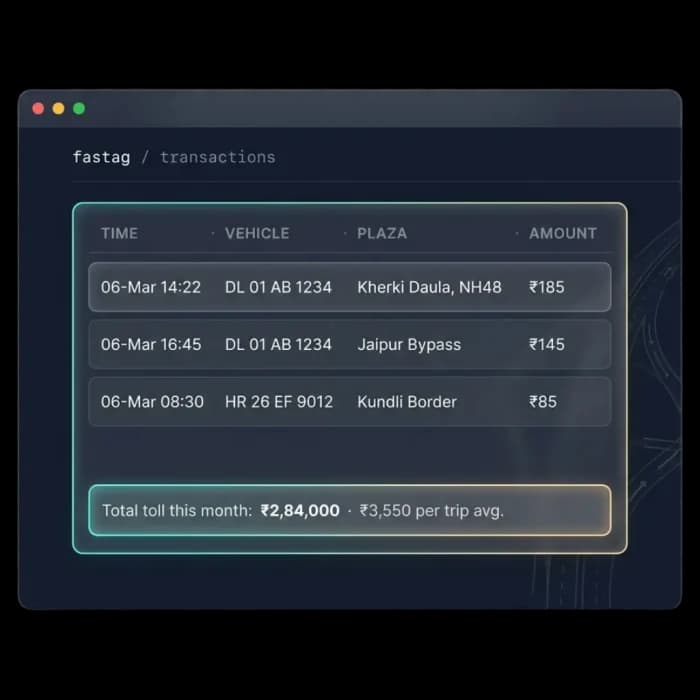
See every toll charge as it happens
Every FASTag transaction shows up in real time, including the location, time, vehicle, and amount charged.
- Live FASTag toll updates
- Toll location and timestamp for every charge
- Vehicle-wise toll tracking
- Monthly toll expense overview
Connect tolls to the right trip
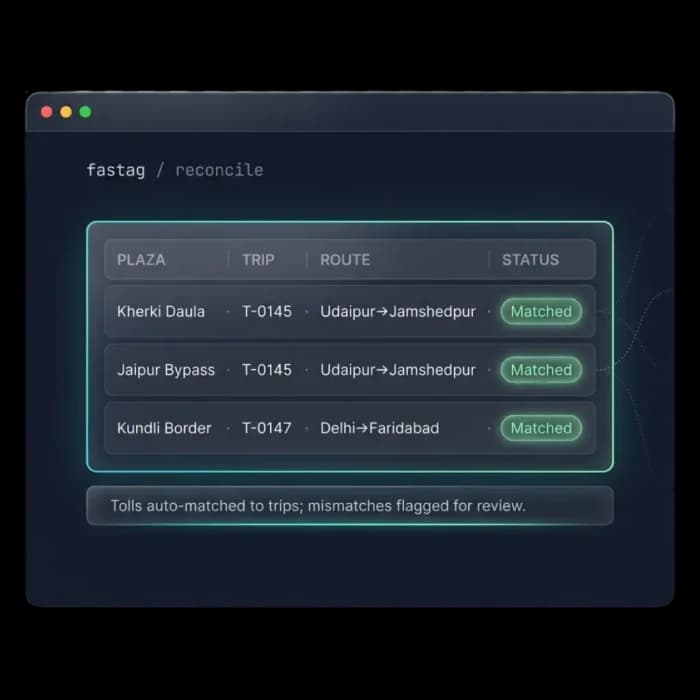
Fleet Scanner automatically links every toll charge to the correct vehicle, trip, and route, so you always know exactly where the expense came from.
- Automatic trip matching for every toll
- Route-wise toll tracking
- Flag unusual or unexpected charges
- Clearer trip visibility
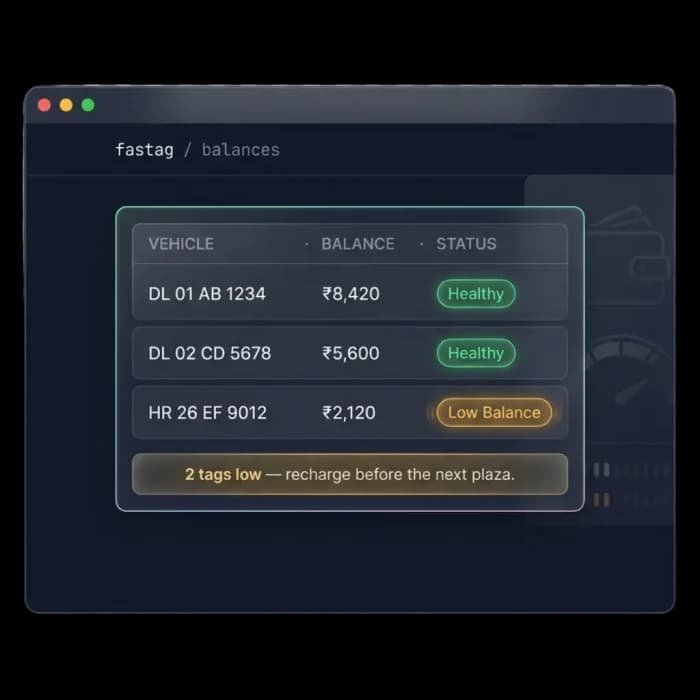
Never let a FASTag balance run low
Get alerts before a balance runs too low, so drivers can keep moving without any interruptions.
- Live FASTag balance tracking
- Instant low-balance alerts
- Fleet-wide balance monitoring
- Faster, easier recharge planning
Understand the real cost of every route
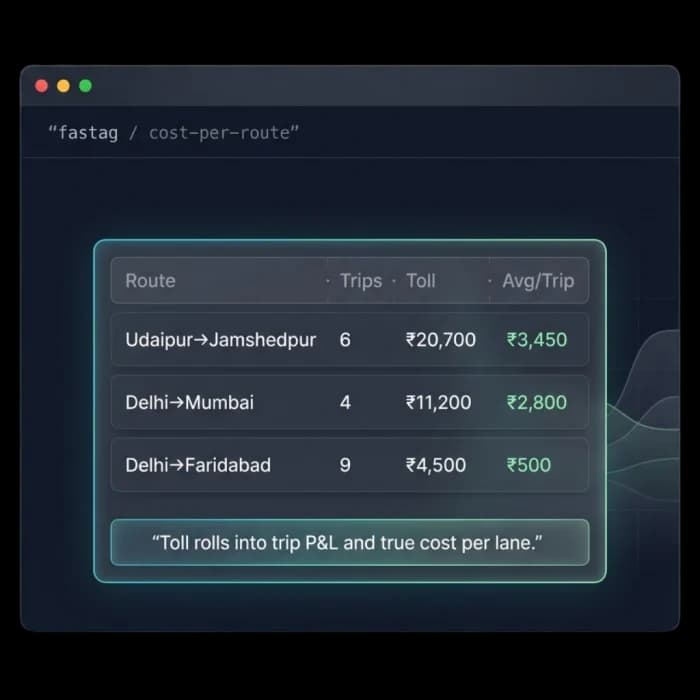
Fleet Scanner shows how much each route spends on tolls and includes the information in trip expenses and profit reports.
Compare lanes side by side, see which corridors carry the heaviest toll burden, and price your freight with the full cost of the route in view.
- Toll spend totalled by route and lane
- Toll cost included in trip expenses and profit reports
- Compare routes to find cheaper alternatives
- Price freight with real toll costs in hand
Better control, fewer surprises, and smarter decisions
Track every rupee
Know exactly where every toll charge comes from and avoid unnecessary costs.
Prevent delays
Low-balance alerts help keep trucks moving without interruptions.
Understand route costs
See the real toll expenses for routes between cities like Delhi, Mumbai, Ahmedabad, and Bengaluru.
Improve trip profitability
Include toll expenses in trip reports to understand your true profit.
Save time
Stop checking statements manually and let Fleet Scanner organize everything automatically.
One connected system
Fleet FASTag Management Software works with trip management, route planning, expense tracking, and reporting in one platform.
From plaza crossing to trip cost
Cross
Vehicle crosses a FASTag plaza.
Sync
Deduction streams in live.
Match
Auto-reconciled to trip & route.
Watch
Balance tracked; low-balance flagged.
Cost
Toll rolls into trip P&L per lane.
FASTag Management FAQs
Simple answers to common questions about how toll tracking works in Fleet Scanner.
Get Free DemoWhat is FASTag Management Software?
FASTag Management Software helps transport companies track toll payments, monitor balances, and connect toll expenses to trips and routes. Fleet Scanner makes it easy to manage toll costs from one dashboard.
How does it connect tolls to trips?
The system automatically matches toll transactions with the vehicle, route, and trip that generated the charge.
Can I get alerts when a FASTag balance is low?
Yes. Fleet Scanner sends low-balance alerts so you can recharge before a vehicle is affected.
Can I see toll costs for each route?
Yes. Every toll charge is linked to the correct route, helping you understand route profitability and expenses.
Does it work with multiple vehicles and FASTags?
Yes. Fleet Scanner can manage toll transactions and balances across your entire fleet.
Does it connect with other Fleet Scanner modules?
Yes. Fleet FASTag Management Software works with trip management, fleet expense tracking, route planning, analytics, and reporting.