
Electronic Proof of Delivery Software That Closes Every Drop
With proof of delivery software from Fleet Scanner, capture a signature, photos, receiver details, and notes right at the delivery point using a mobile phone. Each proof is checked instantly, so you can quickly find damaged or short deliveries before they turn into arguments. As soon as delivery is confirmed, you can send the invoice right away.
Get Free DemoNo proof means no payment and lots of disputes
When delivery proof is on paper, it can easily get lost, damaged, or never returned by the driver. This delays invoices and creates confusion. The gap between delivery and confirmed proof is where companies lose money and trust.
Paper PODs vanish
Signed paper slips often get lost, smudged, or never make it back to the office from the driver.
Billing waits
Invoices cannot be sent until proof arrives, so your money gets delayed while you wait for paperwork.
Disputes you can’t win
Without clear time-stamped proof and photos, it becomes hard to prove if goods were delivered correctly or damaged.
No delivery visibility
The office and customer do not know a delivery is complete until someone calls or confirms later.
Proof of delivery software that captures, verifies and acts
Fleet Scanner turns every delivery into a digital record. It is captured at the door, verified instantly, and ready for billing or dispute handling.
Signature and photos, right at the door
Drivers capture the receiver’s signature right on their phone, take photos of the goods, record who received them, and add any notes. All of this is linked to the trip and delivery record. Paper slips are replaced with a digital record right away.
- On-screen receiver signature capture
- Delivery photos and notes on condition
- Receiver’s name, phone number, and remarks saved
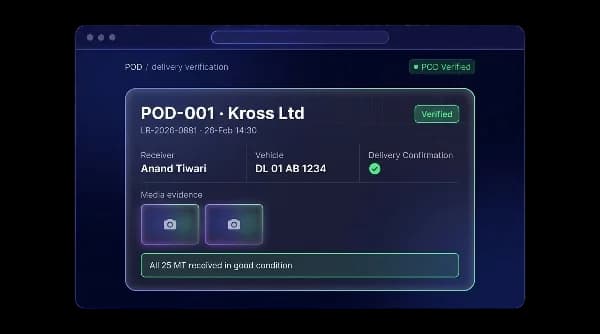
Confirm delivery the moment it happens
As soon as the driver submits the proof, it reaches the office marked "Verified." It includes the signature, photos, time, and receiver details. Everyone knows the delivery is done right away, instead of waiting for paper to arrive.
- Proof of delivery reaches the office instantly
- Signature, photos, time, and receiver details attached
- Live confirmation for the office and the customer
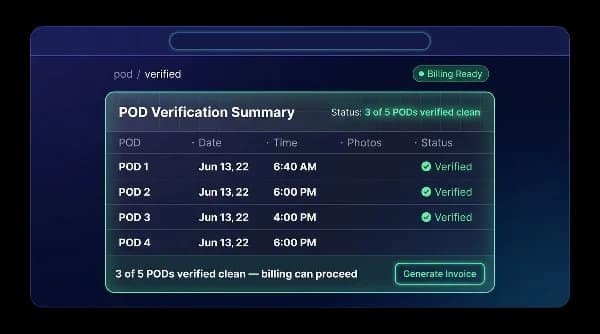
Flag short or damaged deliveries on the spot
If something’s wrong, like missing items or damage, it gets marked "Disputed" right at the moment of delivery. The driver adds notes and photos as proof. These deliveries are held back from billing until the issue is sorted out.
- Disputed status with notes and photos
- Disputed deliveries blocked from invoicing
- Problems shown right away, not at month’s end
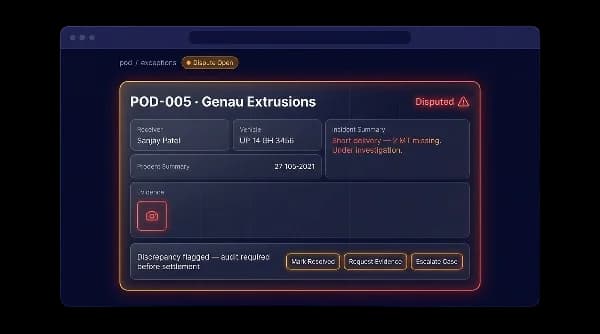
Verified delivery releases the invoice
Once a delivery is verified, that’s the signal to send the invoice. It’s linked to the trip and delivery record, so billing can happen right away. Disputed deliveries stay on hold until they’re fixed.
- A verified delivery unlocks invoicing
- Linked to the trip and delivery record
- Disputed deliveries stay on hold
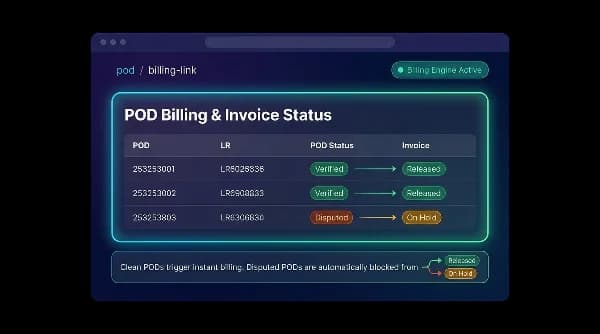
Faster cash, fewer disputes, real proof
Bill the day you deliver
A verified delivery is the trigger to invoice, so cash moves the same day instead of waiting for paperwork to come back.
Win disputes
Time-stamped signatures, photos, and receiver details give you clear evidence whenever a delivery is questioned.
No lost paperwork
Every proof is captured digitally at the door, so nothing gets lost, smudged, or left in the driver’s cab.
Live delivery visibility
Office teams and customers see delivery status in real time.
Catch exceptions early
Damaged or missing goods are reported at delivery, not later during billing.
One connected flow
All delivery proofs connect with trips and invoices in one system.
From delivery to confirmed proof
Deliver
Driver reaches the consignee.
Capture
Signature, photos & remarks on the phone.
Verify
POD lands in office, marked verified.
Flag
Short / damaged drops marked disputed.
Bill
Verified POD releases the invoice.
The complete guide
Proof of delivery software: a complete guide
What is proof of delivery software?
Proof of delivery software is a tool that records, at the moment of delivery, that goods reached the right person in the right condition. Instead of a paper slip signed at the door and carried back to the office days later, the driver captures the proof on a phone and it reaches the office straight away. This is often called electronic proof of delivery, or ePOD.
A good POD system does more than replace paper. It links each proof to the trip and delivery record, lets the driver flag short or damaged goods on the spot, and uses a verified delivery as the signal to send the invoice. Fleet Scanner captures the receiver's signature, photos, name, phone number, time and remarks, marks each proof Verified or Disputed, works offline at the delivery point and connects every POD to trips, delivery documents and invoices.
How proof of delivery software works
- 01ArriveThe driver reaches the consignee and opens the delivery in the mobile app.
- 02CaptureThe receiver signs on screen, the driver photographs the goods and adds the receiver's details and any remarks.
- 03VerifyThe proof reaches the office marked Verified, with signature, photos, time and receiver details attached.
- 04Flag issuesShort or damaged drops are marked Disputed with notes and photos, and held back from billing.
- 05BillA verified POD releases the invoice, so billing can start the same day.
What to look for in proof of delivery software
Signature and photo capture
Clear evidence ends most delivery arguments. Fleet Scanner records an on-screen signature, photos of the goods, the receiver's name and phone number, and remarks.
Instant verification
The office should not wait for paper to know a delivery is done. In Fleet Scanner each proof arrives marked Verified, giving live confirmation to the office and the customer.
Dispute handling
Problems found at month end are hard to fix. Fleet Scanner lets drivers mark short or damaged deliveries as Disputed at the door, with notes and photos.
POD to invoice
Billing delays slow cash flow. In Fleet Scanner a verified delivery unlocks invoicing, while disputed ones stay on hold until resolved.
Offline capture
Delivery points do not always have signal. Fleet Scanner lets the driver capture proof without internet and syncs it later.
Links to trips and documents
A proof on its own is hard to find later. Every Fleet Scanner POD is linked to its trip, delivery documents and invoice.
Manual process vs proof of delivery software
Spreadsheets, paper and phone calls
- Paper slips lost, smudged or left in the cab
- Invoices wait until paperwork returns to the office
- Damage claims hard to prove without photos
- Office learns of delivery only after a phone call
- Short deliveries discovered during billing
With Fleet Scanner proof of delivery software
- Proof captured digitally on the driver's phone
- Verified delivery releases the invoice right away
- Time-stamped signatures and photos settle disputes
- Office and customer see delivery status live
- Short or damaged drops flagged at the door
Who uses proof of delivery software?
Proof of delivery software suits any fleet that delivers goods and bills on delivery: freight carriers, logistics and last-mile delivery companies, distributors and transporters. Drivers use the app at the door, operations teams watch delivery status, billing teams use verified PODs to invoice, and customer service uses the photos and signatures to answer queries.
It pays off as soon as lost paperwork, slow billing or delivery disputes start costing money. Because proof of delivery in Fleet Scanner connects to trips and invoices, the gap between a delivered load and a sent invoice gets much shorter.
Proof of delivery FAQs
Simple answers to common questions about how proof of delivery works in Fleet Scanner.
Get Free DemoWhat is electronic proof of delivery (ePOD)?
Electronic proof of delivery means capturing delivery confirmation like signature, photos, receiver name, time, and notes using a mobile phone instead of paper. Fleet Scanner saves this data with the trip and delivery record, verifies it instantly, and uses it for billing or dispute handling.
What does an ePOD capture?
It captures signature, photos, receiver details, time, and delivery remarks.
How does it speed up billing?
Invoices can be sent immediately after delivery is verified instead of waiting for paperwork.
Is an electronic signature valid as proof of delivery?
In most countries, yes. A signature with a time, place and photo is usually stronger proof than a paper slip, because it is hard to fake and cannot get lost. If your contracts have special rules, check them with your legal adviser.
Do drivers need a special device for ePOD?
No. A normal Android phone or iPhone with the driver app is enough.
What if the customer is not there at delivery?
The driver takes a photo of where the goods were left and adds a note, such as "left at the gate with the guard". The GPS location and time are still saved.
How are disputed or short deliveries handled?
They are marked as disputed with proof and held until the issue is resolved.
Does it work offline at the delivery point?
Yes, delivery proof can still be captured even without internet and synced later.
Does POD connect to trips, LRs and invoices?
Yes, every POD is linked directly to trips, delivery documents, and invoices.