Fleet Transport Management Software
Everything works together in Fleet Transport Management Software. When a customer books a shipment, the system creates the trip, assigns a vehicle, tracks the journey, and helps make sure everything goes as planned. When the trip is finished, it calculates the costs and prepares the final invoice automatically.
Fleet Transport Management Software for Smarter Operations
Fleet Scanner’s Transport Management System (TMS) helps you run your whole transport business from one screen. Every order, every truck, every delivery and every invoice, all connected together so nothing gets lost.
Order Management
See every transport order in one simple board. Know which orders are booked, moving, or delivered without calling anyone or checking a spreadsheet.
Indent & Vehicle Allocation
Match the right truck to the right order in seconds. Your own vehicles get used first so you save money, and market vehicles are added only when you need them.
Control Tower
Watch all your trips live on one screen. Get warned the moment a truck is late or goes off route so your team can fix it before the customer even notices.
Freight Accounting & P&L
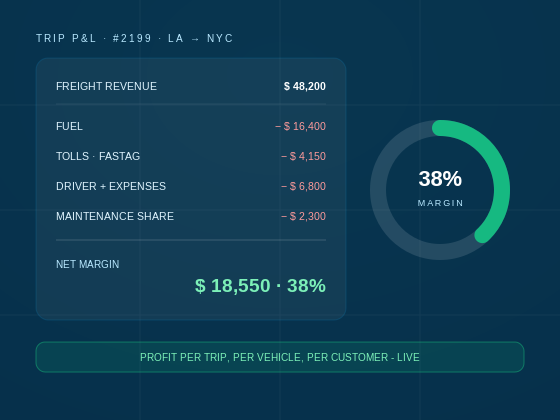
Find out how much profit each trip made. Fuel, tolls, driver pay and all other costs are added up automatically so you always know if a trip is making money.
Complete Transport Management from Order to Invoice
Fleet Scanner TMS connects every step of your transport business. A customer books a shipment, a truck gets assigned, the delivery is tracked live, and the invoice goes out the moment the goods arrive. All of this happens in one place.
No more using five different apps, no more calling drivers to find out where they are, and no more waiting days to find out if a trip was profitable.
- Active Orders Tracked Live
- 68+
- Avg Trip Margin Visible
- 38%
- Trips with POD-Linked Invoice
- 100%
- Platform for Your Whole Business
- 1
Order Management
- One pipeline, every order
- Booked to delivered stages
- Customer status visibility
- Nothing falls through
Indent & Allocation
- Own fleet used first
- Market vehicle hiring
- Broker quotes compared
- Trip sheet in one click
Control Tower
- Live trip exceptions
- Geofence discipline
- ETA-slip escalation
- Customer auto-updates
Freight Accounting & P&L
- Trip-level profitability
- Fuel, toll & driver costs
- Advances reconciled
- Invoice on POD
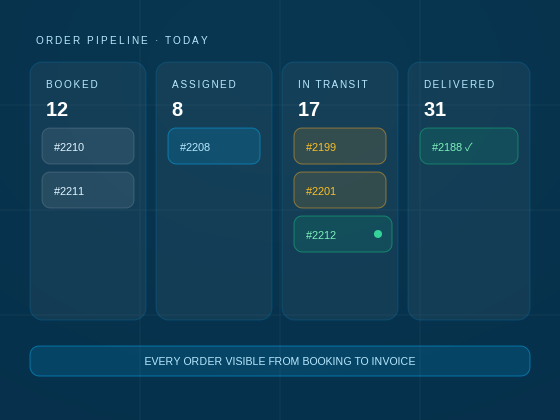
Every transport order on one board
All your bookings move through one simple pipeline: booked, assigned, in transit, delivered. Your whole team sees the same live picture so nobody has to call anyone to find out what is happening.
Live order pipeline
Cards move across the board as trips progress, so your operations team always knows the real status of every order.
Customer visibility
Your customers can check their shipment status without calling your team, which saves time on both sides.
Ageing alerts
If an order stays stuck in one stage for too long, the system flags it so your team can step in before it becomes a problem.
Document trail
LR, e-Way Bill and proof of delivery attach to each order as it moves, so the paperwork is always in the right place.
The right truck at the right price
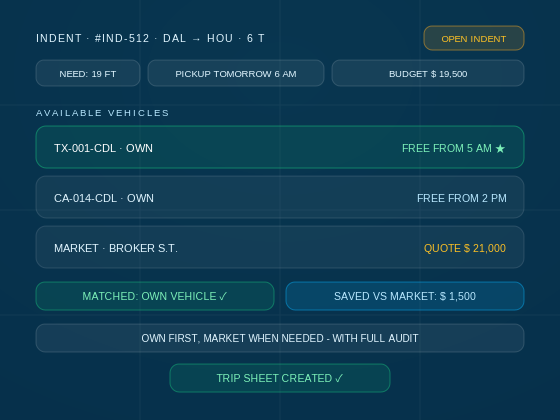
When an order needs a vehicle, Fleet Scanner finds the best match for you. It looks at your own free trucks first. If none are available, it compares market vehicle quotes so you never overpay.
Smart vehicle matching
Your own free trucks are shown first by location and size so you always get the cheapest option without searching manually.
Market vehicle hiring
Broker quotes are captured, compared and settled trip by trip with a full record, so every hire is transparent.
Placement tracking
From the moment an indent is raised to when the truck is at the loading bay, every step is timed so delays are easy to find.
Instant trip sheets
Once a vehicle is assigned, the trip sheet and driver instructions are created and shared automatically in one click.
Catch delays before your customer does
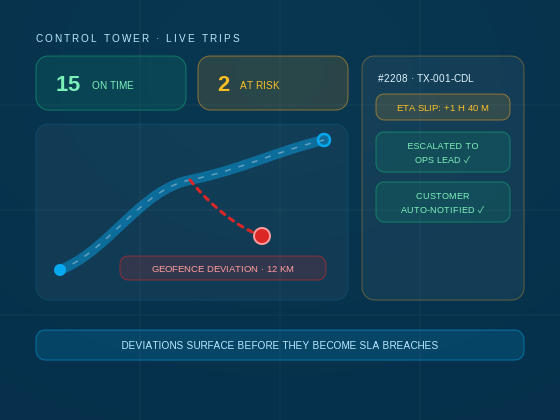
Fleet Scanner watches every trip at the same time and tells your team the moment something is wrong. Route breaks, long halts and ETA slips all show up immediately so your team fixes problems before customers even notice.
Exception dashboard
Only the trips that need attention are shown, ranked by how urgent the problem is, so your team knows exactly where to look.
Geofence compliance
If a truck leaves its planned route or stops somewhere it should not, your team gets an alert right away.
Auto escalation
When a trip looks like it will be late, the right person in your operations team is automatically told so no one has to chase anyone.
Proactive customer updates
Updated delivery times are sent to your customers automatically so they are never left wondering where their shipment is.
Know exactly what every trip earned
After every delivery, Fleet Scanner adds up all the money that came in and all the costs that went out: fuel, tolls, driver pay, maintenance. You see the real profit for each trip the moment it is done.
Trip P&L
See the net profit for every trip, every vehicle, every route and every customer so you know which business to grow.
Automatic cost capture
Fuel sensor data, toll charges and driver expenses come in automatically so costs are always accurate without any manual entry.
Invoice on POD
The invoice is created and sent the moment the driver captures proof of delivery, so you get paid faster every time.
Advance reconciliation
Money given to drivers before the trip is matched against what they actually spent when the trip closes, automatically.
One Platform for Your Entire Transport Business
Fleet Scanner brings transport order management, fleet dispatch, live GPS tracking, proof of delivery, freight billing and trip P&L together in one simple system that any team member can use from day one.
Most transport businesses use separate apps for tracking, billing and orders. This causes confusion, wasted time and missed invoices. Fleet Scanner replaces all of that with one connected platform.
Key Benefits of Fleet Scanner TMS
From freight management software to fleet dispatch and trip management system, every part of the platform talks to each other. When a trip closes, the invoice is ready. When a vehicle is free, it gets matched to the next order. Everything works together without any extra effort from your team.
Faster Dispatching
Assign a truck and create a trip sheet in seconds instead of making phone calls and writing on paper. Your drivers get their instructions immediately.
Live GPS Tracking
See every truck on a live map at any time. Know exactly where each delivery is without calling the driver or guessing arrival times.
Faster Invoice Collection
Invoices go out automatically when proof of delivery is captured so your billing never gets delayed and your cash comes in faster.
The complete guide
Transport management software: a complete guide
What is transport management software?
Transport management software is a tool that runs your transport business from the first booking to the final invoice. It takes a customer order, picks a truck for it, tracks the trip live and works out what the trip earned. People also call it a TMS, a fleet TMS or a TMS fleet management system. The idea is simple: one system for orders, trucks, deliveries and billing, instead of five apps, a notebook and a lot of phone calls.
A plain fleet management system shows you where your trucks are. A TMS fleet management system also knows what each truck is carrying, for which customer, and how much money the trip made. Fleet Scanner joins both in one place. You get an order board, indent and vehicle allocation that uses your own trucks first, a control tower that warns you about late or off-route trips, LR, e-way bill and proof of delivery on each order, and trip P&L with invoices that go out on proof of delivery.
How transport management software works
- 01Book the orderA customer books a shipment and it lands on one order board, where everyone can see if it is booked, assigned, in transit or delivered.
- 02Allocate a truckThe system shows your own free trucks first by location and size. If none fit, you compare market vehicle quotes and pick the best one.
- 03Send the trip sheetOnce a vehicle is assigned, the trip sheet and driver instructions are created and shared in one click.
- 04Watch the tripThe control tower tracks every trip live and alerts your team about route breaks, long halts and late ETAs before the customer notices.
- 05Invoice and count profitWhen the driver captures proof of delivery, the invoice goes out. Fuel, tolls and driver pay are added up so you see the profit for that trip.
What to look for in transport management software
One order board
If orders live in chats and spreadsheets, some get missed. Fleet Scanner puts every order on one board and flags any order stuck in one stage too long.
Own fleet first allocation
Hiring a market truck when your own truck is free wastes money. Fleet Scanner shows your free trucks first and compares broker quotes only when you need more.
Live control tower
You want to hear about a late truck before your customer does. Fleet Scanner shows only the trips that need attention and escalates ETA slips to the right person.
Paperwork on each order
Lost papers hold up billing. Fleet Scanner attaches LR, e-way bill and proof of delivery to each order as it moves.
Trip level profit
Revenue alone does not tell you if a trip was worth it. Fleet Scanner adds fuel, tolls, driver pay and advances to show the P&L for each trip, truck, route and customer.
Links to your other systems
Your TMS should not live alone. Fleet Scanner has a REST API and webhooks, so it can share data with your ERP or accounting tools.
Manual process vs transport management software
Spreadsheets, paper and phone calls
- Orders sit in WhatsApp chats and notebooks.
- Staff call drivers to ask where they are.
- Market trucks are hired without comparing quotes.
- Invoices wait until someone finds the POD.
- Trip profit is a guess until month end.
With Fleet Scanner transport management software
- Every order sits on one live board.
- The control tower shows every trip on a map.
- Own trucks are used first, then the best quote.
- The invoice goes out when the POD is captured.
- Profit for each trip shows when it closes.
Who uses transport management software?
Transport management software suits fleet owners, transport companies, logistics providers and freight brokers. It works for a private fleet that moves its own goods, and for carriers that also hire market trucks. Any road transport business that books, moves and bills loads can use it, including livestock and cattle transport operators who want every trip tracked and every halt on record.
It pays off when orders get lost, when your team spends the day on the phone, or when you only find out a trip lost money weeks later. Fleet Scanner runs on your own server as one complete package, with white label included, unlimited vehicles and users and no per-vehicle monthly fee. It works with 1,000+ GPS devices, comes with web, Android and iOS apps, and can be live in 2 to 3 weeks.
Everything You Need to Know
Simple answers to common questions about how the Transport Management System works in Fleet Scanner.
Get Free DemoWhat is a Transport Management System (TMS)?
A Transport Management System (TMS) is software that helps transport and logistics companies manage orders, assign vehicles, track deliveries, handle freight billing, and measure trip profitability from one platform. It simplifies daily operations and improves fleet efficiency.
How does Fleet Scanner's Transport Management System work?
Fleet Scanner connects every stage of the transport process. Orders are created, vehicles are allocated, trips are tracked in real time, proof of delivery is captured, and invoices are generated automatically. Everything happens within a single system.
Can Fleet Scanner help me track trucks in real time?
Yes. Fleet Scanner provides live GPS tracking through its Control Tower. You can monitor every trip, receive alerts for route deviations, delays, and long stoppages, and keep customers updated with accurate delivery information.
How does vehicle allocation work in Fleet Scanner?
The system automatically matches available vehicles to transport orders based on location, capacity, and availability. It prioritizes your own fleet first and allows you to compare market vehicle options when additional capacity is needed.
Can I measure profitability for each transport trip?
Yes. Fleet Scanner automatically combines revenue and expenses such as fuel, tolls, driver payments, and other trip costs to generate a detailed trip-level Profit & Loss (P&L) report, helping you understand exactly how much each trip earns.
Is Fleet Scanner suitable for both fleet owners and transport brokers?
Yes. Fleet Scanner is designed for fleet operators, transport companies, logistics providers, and freight brokers. It helps manage orders, hired vehicles, customer deliveries, billing, and operational performance from one centralized platform.
What is the difference between a fleet TMS and a fleet management system?
A fleet management system looks after the vehicles: where they are, how they are driven and when they need service. A fleet TMS looks after the jobs those vehicles do: orders, truck allocation, trip tracking, proof of delivery and billing. Fleet Scanner gives you both in one system, so the truck on the map and the order it carries are always linked.
Is there TMS software for a private fleet?
Yes. Fleet Scanner works for a business that runs its own trucks to move its own goods, not only for carriers that move goods for others. Your own vehicles are always shown first when you allocate a trip. You still get the order board, live tracking and the cost of each trip.