Fleet Maintenance Software That Prevents Costly Breakdowns
A vehicle breakdown affects much more than the repair bill, and fleet maintenance management software exists to stop it happening. It can delay deliveries, increase operating costs, disrupt schedules, and impact customer satisfaction. Most breakdowns happen because services are missed, maintenance records are incomplete, or early warning signs go unnoticed.
Fleet Scanner™ Fleet Maintenance Management Software helps you stay ahead of problems with preventive maintenance scheduling, digital work orders, repair tracking, and parts management. Keep vehicles running safely and reduce unexpected downtime across your fleet.
Get Free Demo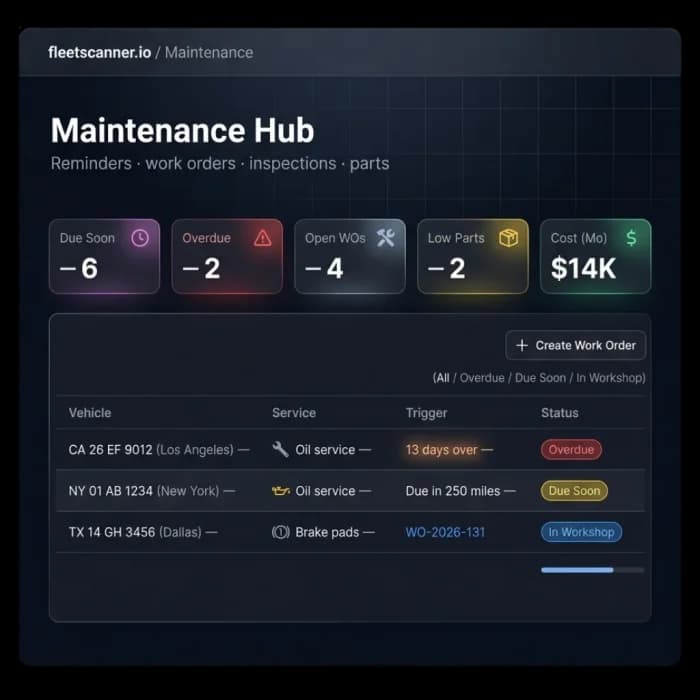
What is fleet maintenance software?
Fleet maintenance software plans and records the servicing of every vehicle in a fleet. It reminds you when a service is due by kilometres, engine hours or date, turns driver defect reports into work orders, and keeps the full repair and cost history of each vehicle. That way small faults get fixed before they become breakdowns on the road.
Fleet Scanner fleet maintenance at a glance
- Service reminders by km, engine hours or calendar date
- Digital work orders with parts and labour costs
- Driver defect reports that turn into jobs
- Tyre, battery and spare parts tracking
- Full service and cost history for each vehicle
- Maintenance costs feed cost per km reports
Updated
Maintenance Problems That Hurt Fleet Performance
Without a proper maintenance system, small issues often become expensive repairs.
Missed Service Intervals
Vehicles continue operating past service due dates, increasing the risk of breakdowns and costly repairs.
Poor Workshop Visibility
Paper job cards and manual processes make it difficult to track ongoing maintenance work.
Rising Repair Costs
Many fleets struggle to understand how much they are spending on each vehicle over time.
Untracked Parts and Components
Tyres, batteries, and spare parts often fail unexpectedly because there is no tracking system in place.
Inside Our Fleet Maintenance Management Software
Preventive maintenance scheduling: Fleet Scanner™ automatically tracks service intervals and alerts your team before maintenance is due.
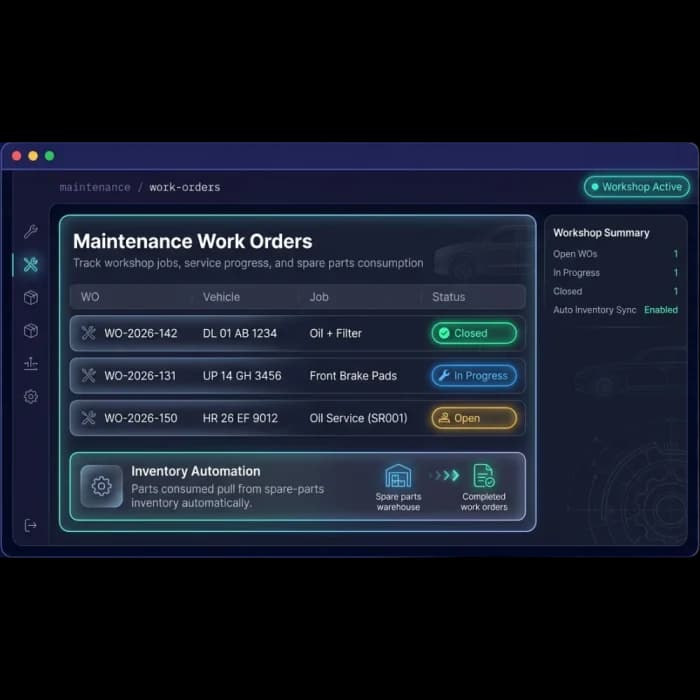
Manage workshop operations without paperwork
Create, assign, and track maintenance jobs from start to finish, while keeping all service records neat and organized.
- Digital work orders
- Track tasks and labor
- Records of parts used
- Live updates on maintenance status
Understand the true cost of every vehicle
Keep track of repairs, services, labor, and replacement parts, all in one complete maintenance record.
- Full maintenance history
- Track how much repairs cost
- Reports on vehicle expenses
- See the total cost of owning each vehicle
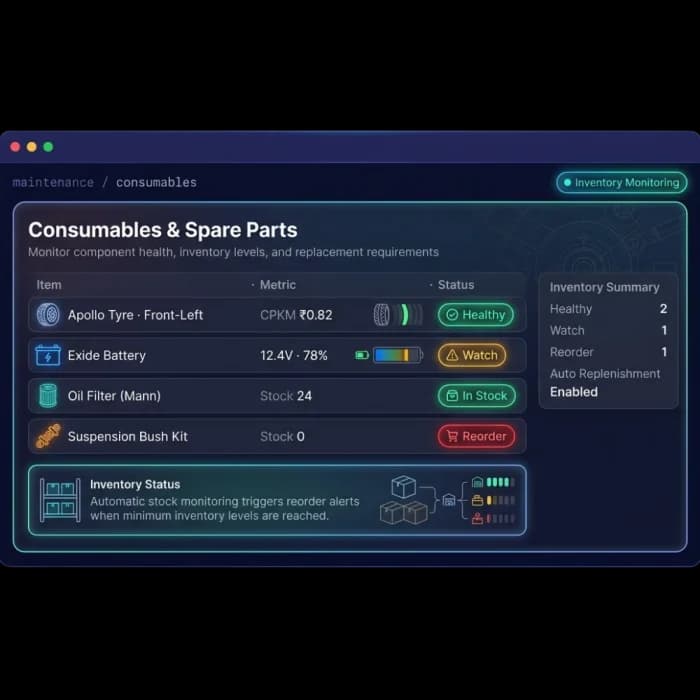
Monitor critical components before they fail
Track tire condition, battery health, and spare parts, all from one place.
- Tire lifecycle tracking
- Battery health monitoring
- Spare parts inventory management
- Alerts and reminders when something needs replacing
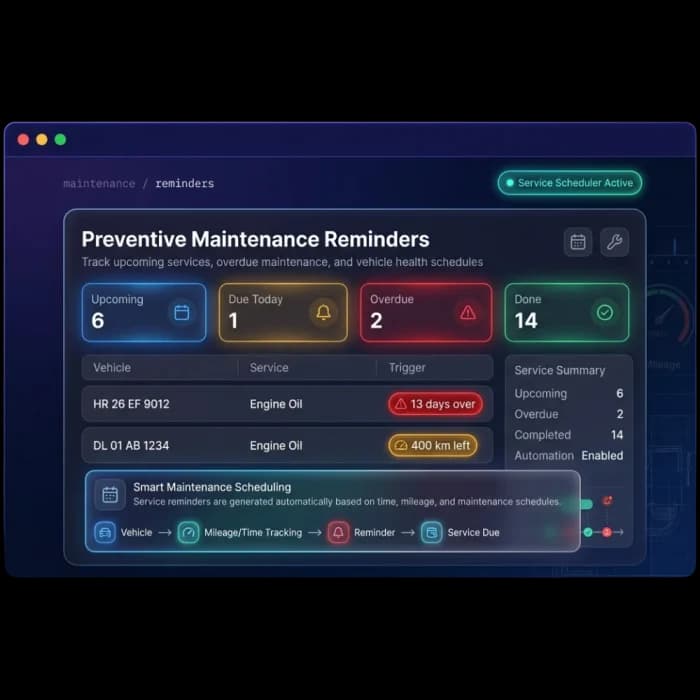
Service Reminders That Keep Maintenance on Schedule
Missing a service can lead to expensive repairs, surprise breakdowns, and vehicles stuck off the road. Fleet Scanner™ helps you stay ahead by automatically tracking service schedules and sending reminders before work is due.
You can set service intervals based on both time and mileage, so vehicles get serviced at the right moment no matter how often they’re used. Managers can quickly see which services are coming up, which are due today, and which have been missed, all from one dashboard.
- Set service reminders based on mileage and time
- See upcoming, due, and overdue services at a glance
- Get alerts through the web, mobile app, email, and text message
- Never miss an important service again
Fewer breakdowns, longer vehicle life, clear cost
Reduce Unexpected Breakdowns
Identify maintenance needs early and prevent costly roadside failures.
Extend Vehicle Lifespan
Regular maintenance helps vehicles stay productive for longer.
Lower Repair Costs
Fix small problems before they become major repairs.
Improve Workshop Efficiency
Manage service jobs, technicians, and parts from one system.
Control Maintenance Spending
Track every maintenance expense and understand vehicle ownership costs.
Increase Fleet Availability
Keep more vehicles on the road and generating revenue.
From service due to cost logged
Remind
Service triggers on time or km.
Inspect
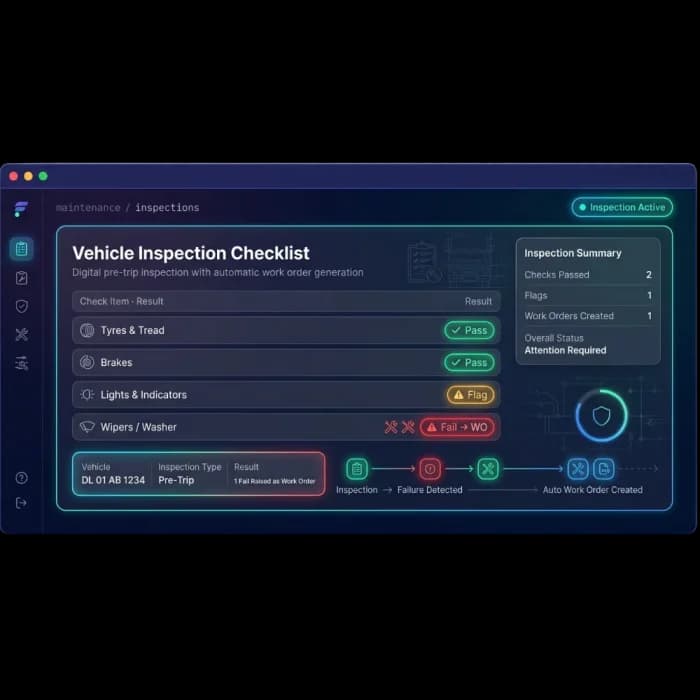
Checklist flags any defects.
Work order
Job raised with parts & labour.
Parts
Pulled from inventory; reorder if low.
Cost
Rolled into the vehicle’s record.
The complete guide
Fleet maintenance management software: a complete guide
What is fleet maintenance management software?
Fleet maintenance management software is a system that helps fleet operators schedule vehicle services, track repairs, monitor parts and costs, and prevent breakdowns before they happen. It replaces paper job cards and spreadsheets with one maintenance record for every vehicle. You may also hear it called fleet maintenance software, a vehicle maintenance system or a workshop management tool.
A complete fleet maintenance system covers more than reminders. It handles inspections, work orders, parts, tyres, batteries and the true cost of each vehicle. Fleet Scanner brings these together with preventive scheduling on time and mileage, AI predictive alerts, digital work orders and full repair history, all connected to your GPS tracking and trip data. Because service counters update from real usage, a vehicle that runs more gets serviced sooner, and its full history is ready when you decide whether to repair or replace it.
How fleet maintenance management software works
- 01RemindA service triggers on time or kilometres, using actual usage from GPS trip data.
- 02InspectAn inspection checklist flags defects, and a failed check can create a work order automatically.
- 03Work orderThe job is raised with tasks, parts and labour, assigned, and tracked until it is closed.
- 04PartsParts are pulled from inventory, and low stock is flagged for reorder.
- 05CostThe finished job's cost rolls into the vehicle's maintenance history and cost reports.
What to look for in fleet maintenance management software
Preventive scheduling
Missed intervals lead to breakdowns. Fleet Scanner sets intervals in kilometres, engine hours or calendar days and alerts the team before service is due.
Predictive alerts
Some faults show up in data before they show up on the road. AI looks at fuel trends, brake usage, engine behaviour and service history to flag vehicles worth inspecting.
Digital work orders
Paper job cards hide what the workshop is doing. Work orders record tasks, labour and parts, with live status updates.
Repair cost history
Repair or replace decisions need numbers. Every repair, service and part is recorded, with a total cost of ownership view per vehicle.
Tyre and battery tracking
Components often fail without warning. Fleet Scanner tracks tyres by wheel position and kilometres and monitors battery health.
Spare parts inventory
A missing part keeps a truck in the workshop. Parts inventory sits inside the maintenance module, with replacement alerts.
Manual process vs fleet maintenance management software
Spreadsheets, paper and phone calls
- Vehicles run past service due dates
- Paper job cards hide workshop progress
- No clear cost per vehicle over time
- Tyres and batteries fail without warning
- Repair or replace decided on gut feeling
With Fleet Scanner fleet maintenance management software
- Services triggered by time or kilometres automatically
- Digital work orders with live status
- Repair and parts costs logged per vehicle
- Tyre, battery and parts alerts before failure
- Full history and ownership cost guide decisions
Who uses fleet maintenance management software?
Fleet managers, workshop heads, maintenance planners and finance teams use fleet maintenance management software. It suits trucking and logistics fleets, buses, delivery vans and any operation that runs its own workshop or works with outside garages. Workshops see open work orders and parts in one place, while finance sees exactly what each vehicle has cost to keep on the road.
It pays off when breakdowns start costing deliveries, when nobody can say what a vehicle has cost to keep running, or when the fleet is too large for a wall chart. Service reminders reach the team through the web, mobile app, email and text message, so planned work happens on time. Over months, the cost reports show which vehicles are worth keeping and which are costing too much to run.
Everything You Need to Know
Simple answers to common questions about how maintenance management works in Fleet Scanner.
Get Free DemoWhat is fleet maintenance management software?
Fleet maintenance management software helps fleet operators schedule vehicle services, track repairs, monitor parts and costs, and prevent breakdowns before they happen. Fleet Scanner™ combines preventive maintenance scheduling, AI predictive alerts, digital work orders, and full repair history in one platform connected to your GPS tracking and trip data.
How does AI predictive maintenance work in Fleet Scanner™?
Fleet Scanner™ analyses vehicle data including fuel consumption trends, brake usage patterns, engine behaviour, and service history to identify vehicles that may be developing a problem. When the AI detects an unusual pattern it sends an alert to your maintenance team so they can inspect the vehicle before a minor issue becomes a breakdown.
What is a digital work order and how does it work?
A digital work order is a record of every task, part, and labour charge associated with a vehicle service or repair job. When a vehicle goes into the workshop, your team creates a work order in Fleet Scanner™, records everything done against it, and closes it when the job is complete. The cost is automatically added to the vehicle’s maintenance history.
What features should fleet maintenance software have?
Look for service reminders by kilometres, engine hours and date, digital work orders, driver defect reporting, parts and tyre tracking, and a cost history for each vehicle. Fleet Scanner has all of these, linked to live GPS distance so reminders are based on real use.
How do I make a fleet maintenance schedule?
List each vehicle type, set a service interval for it in kilometres, engine hours or days (start with the maker’s handbook), and add checks such as tyres and brakes. Fleet Scanner then counts down each interval from GPS data and reminds you before a service is due.
What is vehicle maintenance tracking software?
It is software that records every service, repair and part fitted to each vehicle, so you can see what was done, when and what it cost. In Fleet Scanner this record sits inside fleet maintenance, next to reminders and work orders.
Can drivers report a problem with the vehicle?
Yes. Drivers report defects from the app, and the report becomes a work order for the workshop, so a small fault is not forgotten until it becomes a breakdown.
How does fleet maintenance software cut costs and downtime?
It reminds you before a service is due, turns driver defect reports into work orders and keeps a full service history for each vehicle. Problems get fixed in the workshop on your schedule, not at the roadside after a breakdown.
What is the difference between preventive, predictive and reactive maintenance?
Reactive maintenance means fixing a vehicle after it breaks. Preventive maintenance means servicing on a fixed schedule by kilometres, engine hours or date. Predictive maintenance uses vehicle data to service a part when it starts to show wear.
Is fleet maintenance software different from fleet management software?
Yes. Fleet management software covers daily operations such as tracking, trips and drivers. Fleet maintenance software keeps the vehicles running: service schedules, work orders, inspections and parts. Fleet Scanner has both in one system, so service is due on real kilometres and engine hours.
How does Fleet Scanner™ know when a vehicle is due for service?
You set the service interval for each vehicle in kilometres, engine hours, or calendar days. Fleet Scanner™ tracks the vehicle’s actual usage from GPS trip data and updates the service counter in real time. When a vehicle is approaching its next service interval the system sends an automatic alert to your maintenance team.
Can Fleet Scanner™ track tyres and batteries?
Yes. Fleet Scanner™ includes tyre tracking by wheel position and kilometre usage, battery health monitoring, and spare parts inventory management within the maintenance module. You get proactive alerts before tyres, batteries, or critical parts need replacing.
How does maintenance history help with vehicle replacement decisions?
When you are deciding whether to repair or replace an aging vehicle, the maintenance history in Fleet Scanner™ gives you the full picture. You can see every repair cost, every service, every part replaced, and the total amount spent on keeping that vehicle running. Combined with the total cost of ownership report, you have everything you need to make the right decision.