
Video telematics dashcam system that puts eyes on every cab
This video telematics dashcam system uses cameras in your vehicles to show live video of the road and inside the cab. It also uses smart AI to notice dangerous driving like speeding, sudden braking, phone use, or drifting out of lane. If something happens, it saves the exact video clip with the time, place, driver, and vehicle details.
Get Free Demo- Vehicle
- KA01AB1234
- Driver
- Ramesh Kumar
- Trip #
- #4482
- Route
- Delhi → Agra
- Distance
- 122 / 220 km
- Status
- In Transit
- Overspeed 82 km/h09:41
- Harsh Braking09:38
- Lane Departure09:30
- Idle Ended 14m09:22
- Front● LIVE
- Rear● LIVE
- Cabin● BUFFERING
- Left Side● LIVE
When something goes wrong, you have no proof
If there is a crash or someone makes a false claim, it becomes one person’s word against another. Without video, it is hard to prove what really happened, and companies often lose money.
No eyes on the cab
What actually happens on the road and in the cab is invisible until it becomes an expensive problem.
Disputes you can't win
Without footage, a staged or false third-party claim is your word against theirs and you usually lose.
Unseen distraction
Phone use, fatigue and harsh driving go undetected until they cause a crash you could have prevented.
Rising premiums
No evidence of safe driving means higher insurance costs and no leverage to bring them down.
Live view of all vehicles
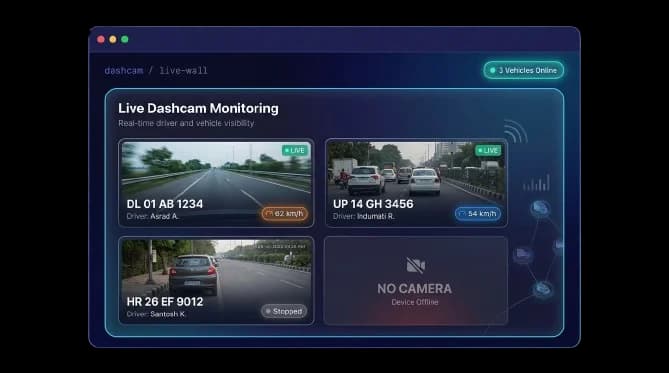
You can see all your vehicles on one screen in real time. Each camera shows the driver, speed, and vehicle status. You can also tell if a camera is offline or missing.
Every cab on one screen, in real time
See live road-facing and in-cab feeds across the fleet in a single grid, each tile showing the vehicle, driver, speed and status. Online and offline cameras are clear at a glance so a camera that's down, or a vehicle without one, never hides.
- Live multi-camera grid across all vehicles
- Plate, driver, speed and status per feed
- Online / offline and no-camera states surfaced
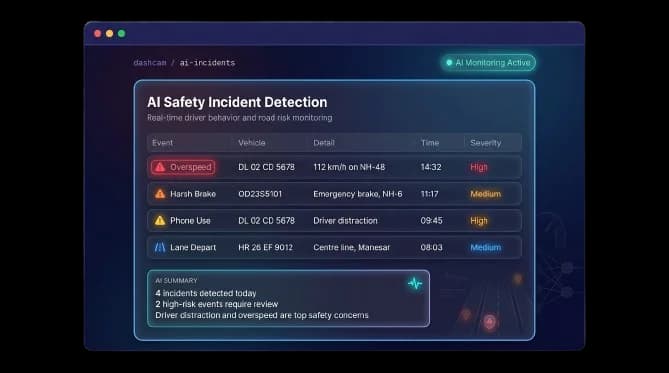
Smart AI alerts
The system watches driving behavior and alerts you instantly if it sees:
- Speeding
- Sudden braking
- Phone use while driving
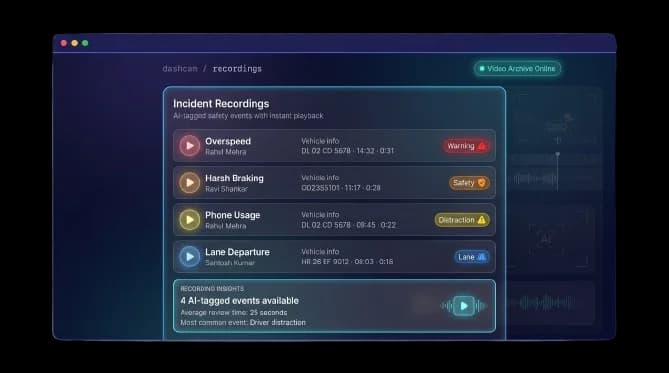
Saves important video clips
Instead of saving hours of video, it saves short clips only when something important happens. You can open the exact moment in seconds.
- Short event clips, not endless raw footage
- Driver, type, time and duration on each clip
- Searchable recordings library per vehicle
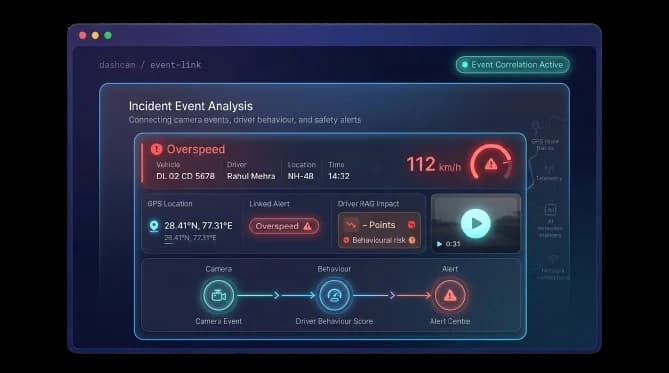
Video that connects to the whole picture
Footage doesn't sit in a silo. Each clip is linked to the vehicle's GPS position, the assigned driver and your alert centre and the AI events feed directly into driver behaviour scoring, so a distraction caught on camera shows up in that driver's RAG safety record.
- Clips linked to live GPS location and route
- Events feed driver behaviour & RAG scoring
- Surfaced alongside the alert centre
Win disputes, coach drivers, cut premiums
Helps win disputes
If someone makes a false claim, you can show the real video proof.
Prevents accidents
Drivers can be trained using real examples of their driving mistakes.
Lowers insurance cost
Safe driving proof can help reduce insurance premiums.
Improves driver behavior
Showing real video helps drivers understand and fix their mistakes faster.
Saves time
You do not need to search hours of video. You find the exact clip instantly.
One clear system
Everything like video, GPS, alerts, and driver scores is in one place.
From road to recorded evidence
Capture
Cameras stream road & cab video.
Detect
AI flags risky events live.
Clip
Short recording saved per event.
Link
Tagged to GPS, driver & alert.
Act
Coach, dispute or claim with proof.
Everything You Need to Know
Simple answers to common questions about how video telematics works in Fleet Scanner.
Get Free DemoWhat is dashcam or video telematics?
It is a system that uses cameras in vehicles and software to watch driving, record video, and detect unsafe behavior.
What can the AI detect?
The AI watches driving behaviour and flags speeding, sudden or harsh braking, phone use while driving, and lane departure, alerting you the moment it sees them.
Can I watch live video?
Yes. You can see all your vehicles on one screen in real time. Each camera tile shows the driver, speed, and vehicle status, and offline or missing cameras are clear at a glance.
How does it help with insurance?
Video evidence lets you defend against staged or false third-party claims, and a record of safe driving can help you negotiate lower premiums.
Does it track driver behavior?
Yes. AI events feed directly into driver behaviour scoring, so a distraction caught on camera shows up in that driver’s RAG safety record.
Do I need cameras in vehicles?
Yes, the system uses road-facing and in-cab cameras. Fleet Scanner shows which vehicles have cameras online, offline, or none fitted, so gaps never go unnoticed.