Skip to content
Fleet Scanner
Hardware integration · Teltonika FMB002

Teltonika FMB002 OBD tracker, working inside Fleet Scanner

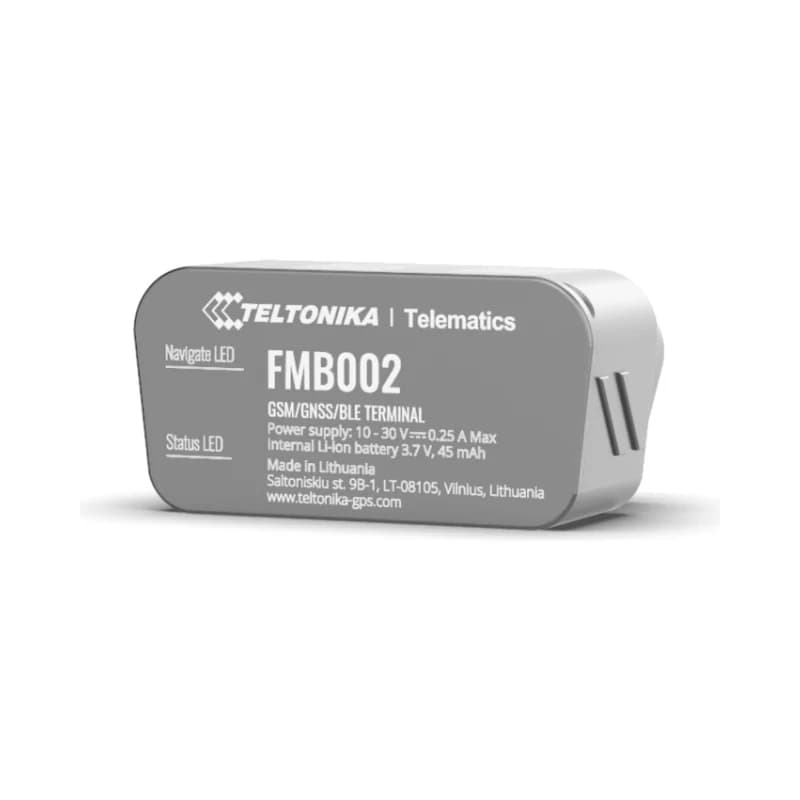
The Teltonika FMB002 is a small 2G GPS tracker you plug into a car’s OBD port. That is the small socket under the steering wheel that mechanics use. It needs no wires and no installer. Teltonika says it is half the size of the older FMB001. It sends the car’s location, engine data and alerts to Fleet Scanner.

OBD plug and play2G mobile network32 engine valuesBluetooth wireless sensors
Teltonika FMB002 OBD plug-in GPS tracker
0wires to connect
32engine values it can read
50%of the size of the FMB001
128 MBmemory
30 gweight
live_position
Speed 48 km/hEngine ON
01 · Live tracking · Every record

Plug it in and see the car on the map

The FMB002 gets its power from the OBD socket, so it starts as soon as you plug it in. It finds its position with GPS, GLONASS, Galileo and BeiDou. It knows the engine is on from the car’s voltage, engine speed or its motion sensor. Fleet Scanner shows the car live on the map with its speed and engine on or off. It keeps every trip so you can play it back.

24 Speed239 Engine on/off240 Moving or stopped16 Total distance69 GNSS status
GPS fleet tracking software →
engine · OBD
Coolant 86 °CFaults 0
02 · Engine data · OBD-II

Read engine data straight from the car

Through the OBD socket the FMB002 can read up to 32 values from the car’s computer. These include engine speed (RPM), engine load, coolant temperature, fuel level, fault codes and the VIN number. It works with both K-Line and CAN bus cars. Which values you get depends on the car. Fleet Scanner uses them to plan servicing and spot problems early.

36 Engine RPM31 Engine load32 Coolant temperature48 Fuel level281 Fault codes256 VIN
Preventive maintenance scheduling →
driving · accelerometerX -612Y 180Z 990
Hard brakingScore -2 pts
03 · Driving and safety · Motion sensor

Harsh driving, speeding and crash alerts

A motion sensor (accelerometer) inside notices hard braking, fast starts and sharp turns. It also notices crashes. The tracker reports speeding and long idling too. Idling means the engine runs while the car stands still. Fleet Scanner turns these events into a simple score for each driver.

253/254 Harsh driving type/value255 Speeding251 Idling247 Crash
Driver scorecards →
security · alerts
Unplugged
04 · Unplug and towing · Events

Know if someone unplugs it, tows the car or blocks the signal

Because the FMB002 is easy to plug in, it is also easy to pull out. So it tells you when it is unplugged. It also tells you when the car is moved with the engine off, and when someone blocks the mobile signal (jamming). Its small backup battery keeps it going long enough to send the alert. Fleet Scanner sends each one to the right person at once.

252 Unplugged246 Towing249 Jamming
Real-time fleet alerts →
bluetooth · sensors
Van 4 °C
05 · Bluetooth sensors · Bluetooth 4.0 + LE

Add wireless temperature and humidity sensors

The FMB002 can talk to small Bluetooth sensors and beacons. For example, you can put a temperature and humidity sensor in a delivery van. Fleet Scanner saves each reading with the trip, so you can show it to a customer later.

25-28 Bluetooth temp 1-410800 EYE temperature 1
Fleet reports and dashboards →
geofence · trip
Zone Depot AExit
06 · Zones and trips · Scenarios

Zones on the map and trips you can play back

A geofence is a zone you draw on the map. Auto Geofence warns you when a parked car moves away. The Trip feature splits the day into separate trips. In Fleet Scanner you can add as many zones as you like, such as depots and customer sites.

175 Auto geofence250 Trip199 Trip distance
Fleet geofencing software →

FMB002 specifications

Network2G (GSM) quad-band 850/900/1800/1900 MHz, GPRS
SatellitesGPS, GLONASS, Galileo and BeiDou; 33 tracking channels
AccuracyUnder 2.5 m (CEP)
PowerFrom the car’s OBD socket
Backup battery45 mAh
Car protocolsSAE J1850 (PWM and VPW), ISO 9141-2, ISO 14230 (KWP2000) and ISO 15765 (CAN)
ExtrasBluetooth 4.0 + LE, accelerometer, Micro-USB
Memory128 MB
SIMNano-SIM
Size and weight52.6 x 29.1 x 26 mm, about 30 g, IP41
Fleet Scanner port11922

Specifications can differ between hardware revisions. Check the manufacturer’s datasheet for your exact unit.

How to connect the FMB002 to Fleet Scanner

  1. Put a data Nano-SIM card in the FMB002. Use the Teltonika Configurator to set your SIM internet settings (APN) and your Fleet Scanner server address with port 11922.
  2. Find the OBD socket. It is usually under the dashboard, near the steering wheel.
  3. Plug the FMB002 in. In Fleet Scanner, add it using its IMEI number and pick the car.
  4. Start the engine and drive a little. The car should appear on the live map.

Teltonika FMB002 FAQ

Does Fleet Scanner work with the Teltonika FMB002?

Yes. Fleet Scanner reads its location, engine on/off, OBD engine data, driving alerts, unplug alerts and Bluetooth sensors. It uses port 11922.

What is the difference between the FMB002 and the FMB001?

Both plug into the OBD socket and use 2G. Teltonika says the FMB002 is half the size of the FMB001. It weighs about 30 g instead of about 63 g. It also has a smaller backup battery (45 mAh instead of 170 mAh).

Can I still buy the FMB002?

No. Teltonika stopped taking orders in February 2023 and ended support in March 2025. FMB002 trackers already in cars still work with Fleet Scanner.

Can the FMB002 stop the engine?

No, it has no output to stop the engine. If you need that, use a wired tracker like the Teltonika FMB920 with a relay.

FMB002 plugged in. Every car on one map.

From a single tracker to a mixed fleet across 1,000+ device models: live tracking, alerts, fuel, drivers, maintenance and reports in one self-hosted platform. See it with your own hardware.

Get a free demo

More supported GPS trackers

Parameter IDs are Teltonika AVL IDs listed for the FMB002; engine data depends on what each car shares over OBD. Teltonika lists the FMB002 as end of life. Teltonika and FMB002 are trademarks of Teltonika Telematics. Specifications from the Teltonika FMB002 datasheet and wiki.

Take Control with
Fleet Tracking

Track vehicles in real time, optimize routes, and take full control of your fleet operations.

Free Demo