Skip to content
Fleet Scanner
Hardware integration · iStartek VT206

iStartek VT206 motorcycle GPS tracker, working inside Fleet Scanner

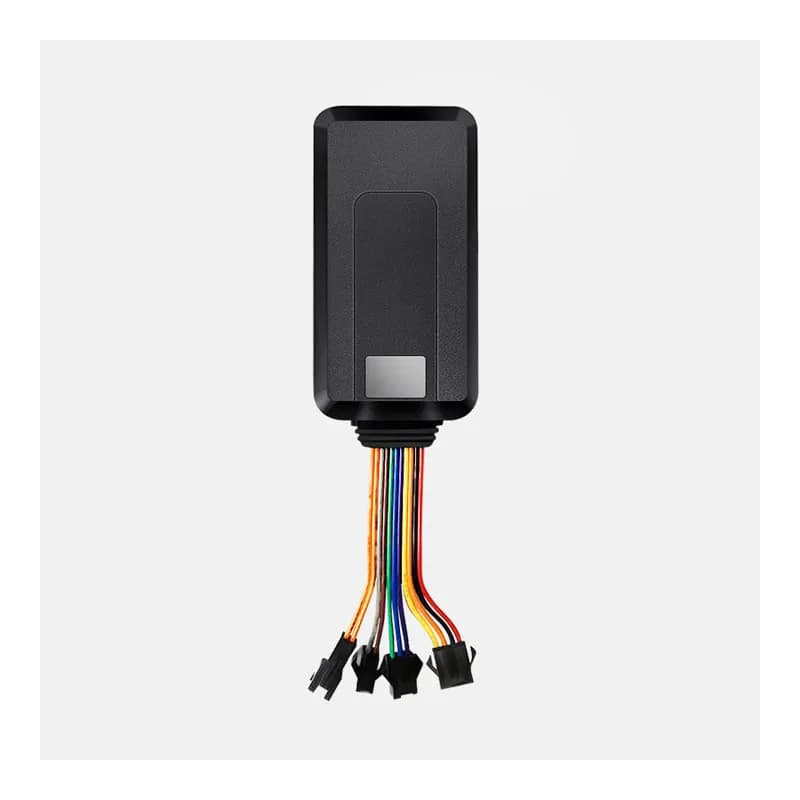
The iStartek VT206 motorcycle GPS tracker is a small wired tracker you hide on a motorbike or an electric bicycle. Both of its antennas sit inside the case, so nothing pokes out to give it away. It reports over 2G, can cut the fuel or power from afar, and has an SOS button for the rider. Fleet Scanner reads its positions and alarms on your own server and shows every bike on one map.

2G quad-band GSMGPS + LBS positioning9 to 36 V vehicle powerPort 10802
Black iStartek VT206 GPS tracker with a flat case and a bundle of coloured wires ending in four plugs
9 to 36 Vpower input
370 mAhbuilt-in backup battery
98 x 53 x 16 mmcase size
10 sshortest report gap
20GPS channels
location · AP01
Bike movingGPS VALID
01 · Live position · GPS

Follow the bike while it is being ridden

The VT206 sends its place to the server in an AP01 message. Each one carries the date and time, latitude and longitude, speed, heading, signal strength, number of satellites, battery level and whether the key is on. The server can change the gap between reports with BP07. The tracker’s own info message gives 10 seconds as the shortest gap. Fleet Scanner draws each ride on the live map and keeps it for playback.

AP00 Login (IMEI)AP01 Location packetBP07 Report gap Speed / heading
Live vehicle tracking →
lbs · cell data
GPS VLBS area
02 · No GPS fix · LBS

A rough position from phone masts in a garage

A motorbike parked under a roof or in a basement often loses the satellites. Every VT206 location message also lists the nearby mobile mast: country code, network code, area code and cell ID. When the GPS flag reads V for invalid, iStartek’s protocol says to use this cell data instead. Fleet Scanner turns it into an area on the map until a real GPS fix comes back.

MCC MNC LAC Cell ID GPS flag A / V
command · BP03 / BP04
Fuel CUTReply done
03 · Remote cut-off · Relay output

Stop a stolen bike by cutting its fuel or power

iStartek built the VT206 to stop a vehicle by breaking its fuel line connection. The server sends BP03 to cut the oil or the electricity, and BP04 to bring it back. The tracker answers each order with the same serial number and a 0 for done or 1 for failed. The heartbeat message then tells Fleet Scanner whether the fuel line is open or cut. Only cut the engine when it is safe to do so.

BP03 Cut oil / electricityBP04 Restore oil / electricity Serial number reply
Vehicle and equipment protection →
alarm · AP10 · 03sleepmoving
Armed ONVibration
04 · Anti-theft · Vibration sensor

Arm the bike and hear when someone moves it

A vibration sensor sits inside the VT206. When the bike is armed and gets shaken, the tracker sends an AP10 alarm with code 03. The server can arm or disarm it with BP02. With BP72 the tracker arms itself after the bike has stood still for a set time, from 1 to 60 minutes. A moving alarm (code 09) is in the list too. Fleet Scanner shows each alarm with the time and place.

AP10 Alarm packetBP02 Arm / disarmBP72 Auto arm timer Vibration (03) Moving (09)
Fleet alerts management software →
alarm · AP10 · 01SOS
SOSRider calling
05 · SOS button · SOS key

A thumb-sized panic button for the rider

The VT206 comes with an SOS button that a rider can press in an emergency. The tracker then sends an AP10 alarm with code 01. The server can save SOS phone numbers with BP11 and clear any of three with BP77. iStartek also lists voice monitoring as an option, so a caller can hear the sound around the vehicle. Fleet Scanner puts the SOS alarm at the top of the alert list.

AP10 Alarm packet SOS (01)BP11 Set SOS numbersBP77 Delete SOS number
Driver management software →
alarm · 04 / 05 / 13
Speed 92 km/hLimit 80 km/h
06 · Zones and speed · Tracker + server

Alarms for leaving a zone or riding too fast

The VT206 alarm list has codes for entering a geo-fence (04), leaving one (05) and speeding (13). The server sets the speed limit with BP06, or with BP74, which also takes how long the bike must stay too fast before the alarm goes off. In Fleet Scanner you can draw zones around a depot, a delivery area or a rider’s home and pick who gets told.

Enter zone (04) Exit zone (05) Speeding (13)BP06 Speed limitBP74 Over speed time
Fleet geofencing software →
heartbeat · CP0112.6V
Power cutBackup 370 mAh
07 · Power and health · Heartbeat packet

Know when the wires are cut or the battery runs low

Between positions the VT206 sends a CP01 heartbeat. It shows the key state, the battery level, the fuel line state and whether outside power is connected. iStartek suggests a heartbeat every 3 minutes, as a gap of more than 5 minutes may drop the link. If a thief cuts the power wire, the tracker sends alarm code 02 and keeps going on its 370 mAh backup battery. Fleet Scanner shows when each tracker was last heard from.

CP01 Heartbeat Power disconnect (02) ACC on / off Battery level
Fleet reports and dashboards →

VT206 specifications

Network2G GSM quad-band 850/900/1800/1900 MHz, GPRS class 12, MTK6262 module
PositioningGPS (20 channels) + LBS; -159 dBm tracking, -144 dBm acquisition sensitivity; 10 m accuracy
Time to first fixCold start under 36 s, warm start under 15 s, hot start under 2 s (open sky)
AntennasGSM and GPS built in
Power supply9 to 36 V
Backup battery370 mAh / 3.7 V
DataTCP and SMS
LightsGSM green, GPS blue, power red
Size98 x 53 x 16 mm
Environment-25 to +60 °C, 5% to 95% humidity
Fleet Scanner port10802 (TCP)

Specifications can differ between hardware revisions. Check the manufacturer’s datasheet for your exact unit.

How to connect the VT206 to Fleet Scanner

  1. Put a SIM card into the VT206. It must work on the 2G (GSM) network and have data (GPRS) and SMS turned on.
  2. Connect the VT206 to the bike’s 9 to 36 V power, then add the ignition (ACC) wire and, if you want remote stop, the cut-off wire. Follow iStartek’s wiring guide for which wire is which. Its small case is made to be hidden, so tuck it under a cover where it is out of sight.
  3. Set the APN (your SIM’s internet settings) and your Fleet Scanner server’s domain or IP with port 10802. iStartek’s public downloads do not include a VT206 SMS command list, so ask iStartek or your dealer for it. The tracker’s info message shows the server, port, APN and report gap it is using.
  4. In Fleet Scanner, add the VT206 by its 15-digit IMEI number and link it to the bike. Start the engine and check the green GSM and blue GPS lights, then make sure the first position shows on the map.

iStartek VT206 FAQ

Does Fleet Scanner work with the iStartek VT206?

Yes. Point the VT206 at your own Fleet Scanner server on port 10802. Fleet Scanner reads its login, location, heartbeat and alarm messages,, including its SOS, power cut, vibration and speeding alarms.

How do I set up the VT206 with SMS commands?

You text the APN, the server address and port 10802 to the SIM in the tracker. iStartek has not put a VT206 SMS list in its public downloads. The SMS list there is for the VT202, a different model. Ask iStartek or your dealer for the VT206 list.

What alarms can the VT206 send?

The VT206 GPRS protocol lists SOS (01), power disconnect (02), vibration (03), enter geo-fence (04), exit geo-fence (05), moving (09) and speeding (13). iStartek’s product page adds a low battery alert. Fleet Scanner shows each one as an alert with the time and place.

How long does the VT206 battery last?

iStartek does not give a battery life. The VT206 runs from the bike’s own 9 to 36 V power. Its 370 mAh battery is a backup that keeps it reporting for a while if the wires are cut, so the power cut alarm can still reach you.

Is the iStartek VT206 still sold, and is it 4G?

iStartek still has a product page for the VT206, with no end of sale note. It works on 2G (GSM) only, so check that 2G still runs where your bikes ride. The same page also shows the iStartek VT900-L, which is a 4G tracker.

VT206 under the seat. Every motorbike on one map.

From a single tracker to a mixed fleet across 1,000+ device models: live tracking, alerts, fuel, drivers, maintenance and reports in one self-hosted platform. See it with your own hardware.

Get a free demo

More supported GPS trackers

Packet codes and alarm codes come from the iStartek VT206 GPRS Protocol V1.1 (Startrack Technology, 2015), which matches the TRV protocol family. Specifications are from the iStartek VT206 product page. iStartek and VT206 are trademarks of their owner.

Take Control with
Fleet Tracking

Track vehicles in real time, optimize routes, and take full control of your fleet operations.

Free Demo