Skip to content
Fleet Scanner
Hardware integration · iStartek PT55

iStartek PT55 asset GPS tracker, working inside Fleet Scanner

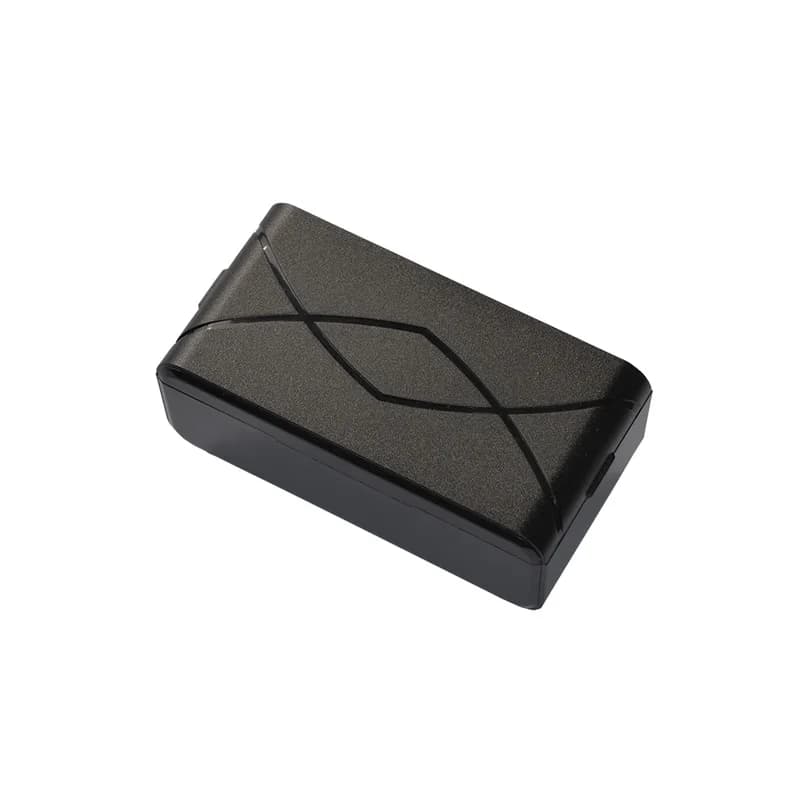
The iStartek PT55 GPS tracker is a small black box with no wires and a strong magnet on the back. It runs on its own battery, and iStartek says it can last 3 years if it sends one report a day. You stick it on a trailer, a container, a truck or a case and leave it there. Each report and alarm lands in Fleet Scanner on your own server, so your loose assets show up beside your vehicles.

2G quad-band GSMGPS + LBS positioning3 years at 1 report a dayPort 10802
iStartek PT55 GPS tracker, a small black rectangular box with a curved line pattern on its lid
3 yearsworking time at one report a day
3working modes
100 gweight
77 x 41 x 27 mmcase size
< 10 mGPS accuracy (CEP)
mode · timing
Next report 24 hGPS FIXED
01 · Timed reports · GPS

A position on the timer you choose

In its timing mode, the PT55 wakes up, finds where it is and sends a report with its position and status. You pick how far apart the reports are. A short gap gives you a fuller trail, and a long gap saves the battery. Fleet Scanner puts each report on the live map and keeps them all, so you can see where a trailer or a box has been.

Position Status Report gap Report time
Live vehicle tracking →
modes · timing / alarm / week68%
Mode TIMINGReports 1 a day
02 · Long standby · Internal battery

Years of tracking from a single battery

The PT55 has no power wire. It lives on the battery inside its case, which uses about 80 mA while it is working. iStartek gives it three working modes: timing mode, alarm mode and week mode. With one report a day, iStartek says it keeps going for 3 years. Fleet Scanner shows when each PT55 last checked in, so a tracker that goes quiet stands out.

Timing mode Alarm mode Week mode Last check-in
Fleet asset management software →
lbs · cell masts
GPS no fixLBS area
03 · Indoor position · GPS + LBS

Phone masts fill in when the sky is hidden

GPS needs to see the sky, and a box in a shed or a closed container often cannot. The PT55 then falls back on LBS, which means it works out a rough place from the mobile masts around it. iStartek adds a guard for this: if the tracker spots a fake mast, it will not connect to it. Fleet Scanner draws these rough positions as a circle, then swaps in the exact point once satellites are back in view.

GPS fix LBS position Fake mast check
alarm · light sensorX -612Y 180Z 990
TamperLight bright
04 · Tamper alarm · Light sensor

An alarm when the tracker is pulled off

A light sensor sits inside the PT55. While it is stuck flat against metal, it stays dark. If someone pulls it away or opens it and the sensor sees light, the tracker sends an alarm to the server. iStartek also says that taking it off the magnet sends an alarm. Fleet Scanner logs when it happened and where the tracker last was, then lets the right people know.

Light sensor Removal alarm Alarm time
Fleet alerts management software →
alarm · low power12.6V
Battery lowAlert sent
05 · Battery warning · Low power alarm

A warning before the battery runs flat

Because the PT55 has no outside power, the battery is the one thing that can stop it. When the battery gets low, the tracker sends a low power alarm. Fleet Scanner turns that into an alert, so someone can swap or charge the tracker while it is still reporting and you do not lose sight of the asset.

Low power alarm Battery state
Fleet reports and dashboards →
sms · set-upDIN1 Ignition ONAIN1 12.4 VDOUT1 Relay OFF
SMS receivedPort 10802
06 · Set up by text · SMS

Change its settings with a text message

There are no buttons to press and no cable to plug in. You set up the PT55 by sending text messages to the SIM card inside it. iStartek lists what you can set this way: the server IP and port, the APN, the device number, and the alarm, timing and week modes. You can also text it to ask where it is. The PT55 sends its data over UDP or SMS.

Server IP and port APN Device number Working mode SMS location query
server · zones
Zone Yard 2Exit
07 · Zones · Fleet Scanner

Zone alerts worked out on the server

iStartek does not list zones that are stored on the PT55 itself. Fleet Scanner checks each position the tracker sends against the zones you draw on the map, such as a yard, a port or a customer site. When a report lands outside its zone, Fleet Scanner sends an alert. With a long report gap, the alert comes at the next report, not the moment the asset moves.

Zone in Zone out Report position
Fleet geofencing software →

PT55 specifications

Network2G GSM quad-band 850/900/1800/1900 MHz, GPRS multi-slot class 12, MT2503D chipset
PositioningGPS + LBS; 22 tracking / 66 acquisition channels; under 10 m accuracy (CEP)
Sensitivity-165 dBm tracking, -148 dBm acquisition, -160 dBm reacquisition
Time to first fixCold start under 40 s, warm start under 30 s, hot start under 5 s (open sky)
PowerInternal battery, 3.0 V DC; about 80 mA while working; 3 years at one report a day
Working modesTiming tracking mode, alarm mode, week mode
SensorLight sensor (tamper alarm)
Antennas and lightsGSM and GPS antennas built in; cellular and GNSS lights
DataUDP and SMS
Size / weight77 x 41 x 27 mm, 100 g, magnetic mount
Environment-20 to +75 °C, 5% to 90% humidity (no condensing)
Fleet Scanner port10802

Specifications can differ between hardware revisions. Check the manufacturer’s datasheet for your exact unit.

How to connect the PT55 to Fleet Scanner

  1. Get a SIM card for a 2G (GSM) network with a data plan (GPRS) and texts allowed, and fit it in the PT55.
  2. Text the tracker to set the APN (your SIM’s internet settings) and your Fleet Scanner server’s IP with port 10802. iStartek’s public pages do not print the exact PT55 SMS commands, so get them from iStartek or the shop that sold you the tracker.
  3. Pick a working mode and a report gap by SMS. One report a day gives the longest battery life. More reports give a fuller trail but use the battery faster.
  4. In Fleet Scanner, add the PT55 by its IMEI number and link it to the trailer, container or case. Stick it to a flat metal part with its magnet, then wait for its first report and look for the pin on the map.

iStartek PT55 FAQ

Does Fleet Scanner work with the iStartek PT55?

Yes. Set the PT55 to send to your own Fleet Scanner server on port 10802. Fleet Scanner shows its positions on the map and turns its tamper and low power alarms into alerts.

How long does the PT55 battery last?

iStartek says the PT55 can work for 3 years when it sends one report a day. More reports a day means a shorter life. Fleet Scanner shows when each tracker last reported and warns you when the low power alarm comes in.

How do I set the server and APN on the PT55?

You send text messages to the SIM card in the tracker. iStartek says you can set the IP and port, the APN, the device number and the working mode this way. Its public pages do not show the command words, so get the PT55 SMS list from iStartek or your dealer.

Can I use the PT55 to track a person?

Only with that person’s knowledge and consent, for example a lone worker who carries it on a job. Tracking someone without telling them is against the law in many places. The PT55 is best used on things you own, such as trailers, containers, trucks and cases.

Is the iStartek PT55 still sold, and does it need 2G?

iStartek still lists the PT55 under its personal and asset trackers, with no end of sale note. Its only network is 2G (GSM). Some countries are switching 2G off, so make sure your mobile network still has it in the places your assets travel. iStartek’s own page also lists the PT60-L, which is a 4G wireless tracker.

PT55 on the trailer. Every asset on one map.

From a single tracker to a mixed fleet across 1,000+ device models: live tracking, alerts, fuel, drivers, maintenance and reports in one self-hosted platform. See it with your own hardware.

Get a free demo

More supported GPS trackers

Specifications come from the iStartek PT55 product page. iStartek gives two different battery sizes on that page, so this page leaves the size out. Battery life is iStartek’s figure and depends on settings and signal. iStartek and PT55 are trademarks of their owner.

Take Control with
Fleet Tracking

Track vehicles in real time, optimize routes, and take full control of your fleet operations.

Free Demo