Skip to content
Fleet Scanner
Hardware integration · ATrack AK7V

ATrack AK7V vehicle tracker, working inside Fleet Scanner

The ATrack AK7V GPS tracker is a small wired box from ATrack in Taiwan, that ATrack says suits all types of vehicle. ATrack builds it in 4G, 3G and 2G versions, so you can pick the one that fits your country. It reports where the vehicle is and what its inputs say, and it lets you switch its outputs from afar. Add-ons give it engine data, driver ID tags, tyre pressure sensors and a voice line to the driver. Fleet Scanner turns all of that into a live map, alerts and reports on your own server.

4G / 3G / 2G four regional versionsGPS + GLONASS with SBASBLE 4.2 optional, for sensorsPort 21655
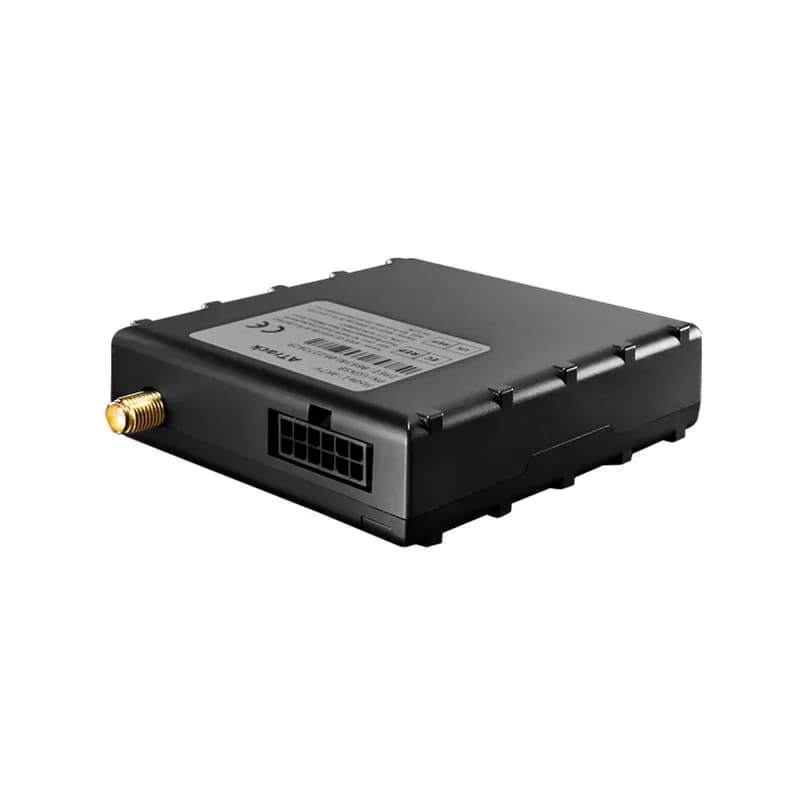
ATrack AK7V vehicle tracker, a small black box with a connector on one side
4network versions
2.5 mposition accuracy (CEP 50%)
135,000logs kept in memory
1.5 mAdeep sleep draw at 12 V
90 gweight
report · location
Van 7 54 km/hGPS fix
01 · Live tracking · GPS + GLONASS

ATrack AK7V GPS tracking with GPS, GLONASS and SBAS

A 99-channel receiver uses both GPS and GLONASS. It also takes help from SBAS correction signals such as WAAS and EGNOS. ATrack gives an accuracy of 2.5 m (CEP 50%). Its 64 Mbit flash memory has room for up to 135,000 logs. Fleet Scanner places every point on the live map and saves each trip for playback.

GPS + GLONASS SBAS 64 Mbit flash TCP / UDP / SMS
GPS fleet tracking software →
vehicle_bus · AC3R
Bus J1939Engine running
02 · Engine data · AC3R adapter

Engine data from cars and heavy trucks through the AC3R

On its own, the AK7V does not read the engine. ATrack sells an add-on called the AC3R that plugs into the tracker’s RS232 port. With it, the AK7V speaks OBDII for cars, plus J1939 and J1708 for trucks and buses. ATrack says this makes the tracker fit all types of vehicle. ATrack’s wiring diagram also shows a fuel level sensor on RS485 and a CMOS camera on RS232. Fleet Scanner keeps the engine values next to each trip and uses them for service reminders.

OBDII J1939 J1708 RS232 port
Preventive maintenance scheduling →
io · inputs + outputsDIN1 Ignition ONAIN1 12.4 VDOUT1 Relay OFF
Ignition ONOutput 1 off
03 · Inputs and outputs · Molex 12-pin

Ignition, door wires and two outputs you control

The 12-pin Molex plug carries one ignition input and up to 3 digital inputs. ATrack’s wiring diagram shows a panic button or an on/off switch on them. Up to 2 analog inputs read a voltage from 0 to 40 V. Two outputs can each sink up to 300 mA, and the diagram shows them driving a buzzer or a 12 V/24 V relay. In Fleet Scanner, the ignition input builds trips and engine hours, and approved users can switch an output from the web or phone app.

Ignition input Up to 3 digital inputs Up to 2 analog inputs 2 digital outputs
Vehicle and equipment protection →
one_wire · driver_idA3 41 9F 00
Driver A. KhanLoad 4.2 °C
04 · Driver ID and temperature · 1-Wire

iButton driver tags and 1-Wire temperature sensors

The AK7V has one 1-Wire port, a simple wire that ATrack lists for driver ID and temperature sensors. A driver touches an iButton tag on the reader before setting off, so each trip has a name on it. The same port also takes a trailer ID, and ATrack makes a 1-Wire temperature sensor for vans that carry cold goods. Fleet Scanner links trips to drivers for scorecards and keeps a temperature line you can share with a customer.

1-Wire port iButton tag and reader 1-Wire temperature sensor
Driver scorecards →
ble · tpms
Rear left lowBLE
05 · Bluetooth sensors · Bluetooth 4.2

Tyre pressure and other wireless sensors over Bluetooth

Some AK7V units come with Bluetooth Low Energy 4.2, which is an option. ATrack names wireless sensors and tyre pressure monitoring (TPMS) as uses for it. Its accessory list has internal and external tyre sensors and a TPMS repeater. With sensors paired, Fleet Scanner can show the readings and warn you before a soft tyre turns into a flat.

BLE 4.2 Class 2 Internal TPMS sensor External TPMS sensor TPMS repeater
Real-time fleet alerts →
voice · two_waySOS
SOSVoice ready
06 · Two-way voice and SOS · Audio jacks

Talk to the driver and get an SOS alert

ATrack built a two-way voice function into the AK7V so that office staff and drivers can talk more easily. The datasheet puts the speaker and microphone jacks (3.5 mm) on the AK7V-2G and AK7V-UG versions. ATrack also sells an SOS push button cable and a locked SOS button for the tracker. ATrack’s diagram wires the panic button to a digital input, and Fleet Scanner can raise each press as an alarm on the map.

Speaker out Microphone in SOS button cable
Fleet alerts management software →
sensor · accelerometerX -612Y 180Z 990
ImpactMoving yes
07 · Motion and impacts · 3-axis accelerometer

A motion sensor that feels bumps and knocks

Inside the box sits a 3-axis accelerometer with a range of ±16 g. ATrack says it is there for motion and impact detection. So the tracker can tell when the vehicle starts to move and when it takes a hard knock. Fleet Scanner turns those reports into alerts and adds them to the vehicle history, so a damaged bumper can be matched to a time and a place.

3-axis ±16 g Motion detection Impact detection
Driver behaviour monitoring →

AK7V specifications

Network versionsAK7V-ME (Europe): LTE FDD B1/B3/B8/B20/B28 and GSM 900/1800. AK7V-MK (Japan): LTE FDD B1/B3/B8/B18/B19/B26. AK7V-UG (global): WCDMA 800/850/900/1900/2100 and GSM 850/900/1800/1900. AK7V-2G (global): GSM 850/900/1800/1900
GNSS99-channel GPS and GLONASS, SBAS (WAAS, EGNOS, GAGAN, MSAS), internal antenna with an optional external SMA antenna
Sensitivity and accuracyTracking -167 dBm, acquisition -149 dBm, 2.5 m CEP 50%
Power12 V or 24 V vehicle system; 50 to 250 mA at 12 V when working, 1.5 mA at 12 V in deep sleep
Backup batteryOptional, 3.7 V 250 mAh
Memory64 Mbit flash, up to 135,000 logs or up to 27,000 positions
Inputs and outputs1 positive ignition input, up to 3 digital inputs, 2 digital outputs (300 mA max sink), up to 2 analog inputs (0 to 40 V DC, 12-bit), 1-Wire, RS232, 3 LEDs (power, GPS, cellular)
Vehicle busOptional, through the ATrack AC3R adapter (OBDII, J1939, J1708)
Wireless and voiceOptional Bluetooth Low Energy 4.2 Class 2; speaker out and microphone (3.5 mm mono jacks) on AK7V-2G and AK7V-UG
Connectors and dataMolex 12-pin I/O, Nano SIM (4FF), RS232 accessory port with 5 V power; UDP/IP, TCP/IP and SMS
Size, weight and case70 x 75 x 21.5 mm, 90 g, flame retardant ABS+PC, adhesive mounting
Operating temperature-40 to +85 °C without battery, -20 to +60 °C with battery; vibration and shock to MIL-STD-810G / SAE J1455
CertificationsCE, FCC, IC, TELEC, JATE, RoHS; module certified with NTT docomo, KDDI and SoftBank
Fleet Scanner port21655

Specifications can differ between hardware revisions. Check the manufacturer’s datasheet for your exact unit.

How to connect the AK7V to Fleet Scanner

  1. Pick the AK7V version for your region: ME for Europe, MK for Japan, or UG and 2G for global use. Slide a Nano SIM (4FF) with mobile data into the tracker.
  2. Fit the AK7V with its adhesive mount and connect it to the vehicle’s 12 V or 24 V supply. Run the ignition wire to the positive ignition input on the 12-pin Molex plug. Add any extras now, such as the AC3R on the RS232 port, an iButton reader on 1-Wire or an SOS button.
  3. Set up the AK7V with ATrack’s own software. The ATrack Configuration Tool (ACT) runs on Windows and talks to the tracker over RS232, while the ATrack Device Management portal (ADM) pushes settings and firmware to many units at once. Enter your SIM’s APN and your Fleet Scanner server’s domain or IP address with port 21655.
  4. Add the tracker in Fleet Scanner by its IMEI number. Turn the key and take a short drive, then check that the power, GPS and cellular LEDs are lit and the dot moves on the live map.

ATrack AK7V FAQ

Does Fleet Scanner work with the ATrack AK7V?

Yes. The AK7V talks ATrack’s own protocol, and Fleet Scanner listens for it on port 21655 on your own server. Its positions, inputs and sensor readings show up on the live map, in alerts and in reports, on the web and in the phone apps.

Which AK7V version should I buy?

It depends on the mobile network where the vehicle drives. ATrack lists four versions: AK7V-ME for Europe and AK7V-MK for Japan both use LTE, AK7V-UG covers 3G and 2G around the world, and AK7V-2G is 2G only. Check the bands in the specs table against your SIM provider.

Where are the AK7V SMS commands and manual?

The only AK7V file on ATrack’s public product documents page is the datasheet. It shows that the tracker can send data by SMS as well as TCP and UDP, but it does not list any SMS commands. For setup, ATrack points to its ACT tool over RS232 and its ADM web portal.

Can the AK7V read fuel, RPM and other engine data?

Only with ATrack’s AC3R adapter. It connects to the tracker’s RS232 port and adds OBDII, J1939 and J1708, which ATrack says covers all vehicle types. The values you get depend on what each vehicle shares on its bus.

Does every AK7V have two-way voice?

No. The datasheet lists the speaker and microphone jacks only on the AK7V-2G and AK7V-UG versions. ATrack sells a speaker and a microphone that plug into those jacks.

How long does the AK7V run without vehicle power?

ATrack does not give a run time. The 3.7 V 250 mAh backup battery is optional, so check your order. In deep sleep the tracker draws only 1.5 mA at 12 V. With the battery fitted, the working range narrows to -20 to +60 °C.

AK7V on the dashboard. Drivers, tyres and trips in one place.

From a single tracker to a mixed fleet across 1,000+ device models: live tracking, alerts, fuel, drivers, maintenance and reports in one self-hosted platform. See it with your own hardware.

Get a free demo

More supported GPS trackers

Features and specs follow the ATrack AK7V product page and the AK7V datasheet (rev. 2020-09-18). Engine data needs the AC3R adapter; Bluetooth and the backup battery are options. ATrack and AK7V are trademarks of ATrack Technology Inc.

Take Control with
Fleet Tracking

Track vehicles in real time, optimize routes, and take full control of your fleet operations.

Free Demo