Skip to content
Fleet Scanner
Hardware integration · Concox AT4

Concox AT4 asset GPS tracker, working inside Fleet Scanner

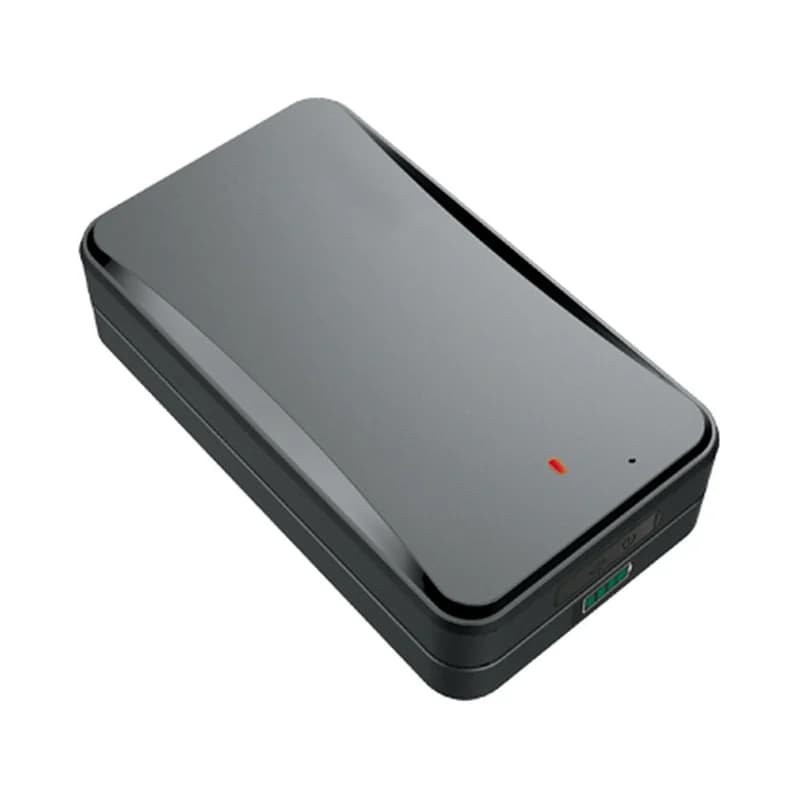
The Concox AT4 GPS tracker is made by Jimi IoT. It runs on a big 10,000 mAh battery and sticks to metal with a strong magnet, so there are no wires to fit. You can use it on trailers, containers, machines and vehicles. It finds its place with GPS, Wi-Fi and cell towers. Fleet Scanner reads its positions, battery level and alarms. So your trailers and equipment sit on the same map as your vehicles.

10,000 mAh internal battery2G quad-band GSMGPS + Wi-Fi + LBS positioningPort 10202
Concox AT4 battery-powered magnetic asset GPS tracker
10,000 mAhrechargeable battery
2.5 yearsstandby in power-saving mode
30 daysof use driving 2 hours a day
7built-in alert types
< 2.5 mGPS accuracy (CEP)
location · 0x12
Report every 10 sGPS FIXED
01 · Tracking mode · Mode 1

Live positions as often as every 10 seconds

In tracking mode, the AT4 stays online and sends its position on a timer. While it moves, you can pick a gap from 10 seconds to 1 hour. While it stands still, you can pick from 3 minutes to 24 hours. Fleet Scanner shows each asset live on the map. It keeps the full route so you can play it back.

0x12 Location packet Moving interval Still interval Satellites Speed
Live vehicle tracking →
standby · mode 268%
Mode STANDBYNext wake 24 h
02 · Long standby · Mode 2

Wakes up, reports, and sleeps again for years

In power-saving mode, the AT4 sleeps most of the time. It wakes up at a set time, sends its position and goes back to sleep. You can set it to wake every 1 to 72 hours. Jimi IoT says this gives up to 2.5 years of standby. Fleet Scanner shows when the next check-in is due, so a quiet tracker is not a surprise.

Wake-up time Wake interval (1 to 72 h) Battery level
Fleet asset management software →
wifi + lbs · positioning
Wi-Fi approx.Towers 3
03 · Indoor location · GPS + Wi-Fi + LBS

A location even inside a yard, shed or container

GPS needs a view of the sky. When the AT4 cannot see satellites, it can still use nearby Wi-Fi networks and the mobile towers around it. These are the country code, network code, area code and cell ID. Fleet Scanner uses them to place the asset in the right area. It switches back to an exact GPS fix as soon as one is ready.

Wi-Fi networks MCC MNC LAC Cell ID
alarm · tamper
TamperTracking 20 min
04 · Tamper alerts · Pressure button

Alerts when the tracker is pulled off or opened

A pressure button on the back of the AT4 pops out when the tracker is taken off. A second switch notices when the cover is opened. Either one sends an alarm, even from standby. The tracker then switches to tracking mode for 20 minutes, so you can follow it. Fleet Scanner sends you the alert straight away.

0x16 Alarm packet Tamper alert Cover removal
Fleet alerts management software →
alarm · vibrationsleepmoving
VibrationArmed ON
05 · Vibration and speed · Accelerometer

Vibration alarm and over-speed alerts

The AT4 has a built-in motion sensor (accelerometer). When it is armed in tracking mode, it sends a vibration alarm if someone shakes or moves the asset. It can also send an alert when the speed goes over a limit. Fleet Scanner saves both with the asset’s history and alerts the right person.

Vibration alarm Over-speed alert
geofence · in / out
Zone Yard 1Exit
06 · Geofences · Alarm packet

Know when a trailer leaves the yard

A geofence is a zone you draw on the map. In tracking mode, the AT4 sends an alarm when the asset goes in or out of its zone. Fleet Scanner also lets you add as many zones as you like on its side. Put them around yards, depots and customer sites. Each zone can have its own alert rules.

Geofence in Geofence out
Fleet geofencing software →
status · 0x1312.6V
Battery 74 %GSM 4/5
07 · Battery and power · Status packet

Battery level, low battery and power alarms

The AT4 sends a low battery alert before it runs out. It can also send an alarm when it is switched on and when it is switched off. You can even block the power button, so nobody can turn it off by hand. Fleet Scanner shows the battery level of every AT4. It warns you in time to charge it.

0x13 Status / heartbeat Low battery Power on alarm Power off alarm
Fleet reports and dashboards →
voice · listen-inSOS
Listen-in callingNumbers 3
08 · Listen-in · Built-in mic

Remote listen-in and alert phone numbers

The AT4 has a hidden microphone. Send a command from an approved phone number and the tracker calls you back. Then you can hear what is going on around it. You can save up to three phone numbers that get its alarms by SMS. Fleet Scanner keeps every alarm in the asset’s history.

Voice monitoring SOS numbers (up to 3)

AT4 specifications

Network2G GSM quad-band 850/900/1800/1900 MHz
PositioningGPS (L1) + Wi-Fi + LBS; < 2.5 m CEP; -165 dBm tracking, -148 dBm acquisition sensitivity
Time to first fixHot start 1 s or less, cold start 32 s or less (open sky)
Battery10,000 mAh / 3.7 V industrial-grade Li-Polymer, rechargeable
Working modesTracking mode and power-saving mode; up to 2.5 years standby in power-saving mode
InterfacesStandard SIM, 1 red status light, 4 blue battery lights, built-in microphone, 32+32 Mb storage
SensorsAccelerometer, pressure-sensitive tamper button, cover removal switch
Size / weight108 x 61 x 30 mm, 285 g, IPX5, -20 to +70 °C
Fleet Scanner port10202 (TCP)

Specifications can differ between hardware revisions. Check the manufacturer’s datasheet for your exact unit.

How to connect the AT4 to Fleet Scanner

  1. Charge the AT4 fully. Open the cover, turn the battery switch to OFF and put in a SIM card that has data (GPRS) and SMS. Turn the switch back on and hold the power button for 3 seconds.
  2. Send the SMS commands to set the APN (your SIM’s internet settings) and your Fleet Scanner server’s domain or IP with port 10202. Choose tracking mode or power-saving mode and the report times you need.
  3. In Fleet Scanner, add the tracker by its IMEI number. Assign it to a trailer, container or machine.
  4. Stick the AT4 to a metal part of the asset with its magnet, or use the 3M tape and bracket on other surfaces. Then check the first positions on the map.

Concox AT4 FAQ

Does Fleet Scanner support the Concox AT4?

Yes. Fleet Scanner reads the AT4’s positions, battery level and alarms. That includes tamper, cover removal, vibration, geofence, low battery and power alarms. It reports on port 10202.

How long does the Concox AT4 battery last?

The battery is 10,000 mAh. Jimi IoT says it lasts up to 2.5 years in power-saving mode. In tracking mode, the user guide gives about 30 days when the asset is driven 2 hours a day. More reports use more battery. Fleet Scanner shows the level and warns you before it runs out.

Does the AT4 need wiring?

No. It runs on its own battery and holds on to metal with a strong magnet. For other surfaces it comes with 3M tape and a bracket. You charge it with the cable and charger in the box.

Is the Concox AT4 waterproof?

The AT4 is rated IPX5, so it can handle splashes and rain. It is built for outdoor assets like trailers and containers.

AT4 switched on. Trailers on the same map as your fleet.

From a single tracker to a mixed fleet across 1,000+ device models: live tracking, alerts, fuel, drivers, maintenance and reports in one self-hosted platform. See it with your own hardware.

Get a free demo

More supported GPS trackers

Packet types follow the Concox GT06 communication protocol. Battery figures are Jimi IoT’s ratings and depend on settings and signal. Concox and AT4 are trademarks of Jimi IoT (Shenzhen Concox Information Technology).

Take Control with
Fleet Tracking

Track vehicles in real time, optimize routes, and take full control of your fleet operations.

Free Demo