Skip to content
Fleet Scanner
Hardware integration · Concox WeTrack 140

Concox WeTrack 140 AIS 140 tracker on your Fleet Scanner server

The Concox WeTrack 140 GPS tracker is an AIS 140 vehicle tracker made for India. It is ICAT approved, so it can be fitted on commercial and passenger vehicles for RTO passing. It finds its place with GPS and IRNSS (India’s own NavIC satellites) and sends a fresh update every 10 seconds over 2G. It has an eSIM, a SIM chip built into the device, with two network profiles. Fleet Scanner runs on your own server. It shows each WeTrack 140 on a live map, turns its panic button and alarms into alerts, reads its door and sensor wires, and lets you cut the fuel from far away.

2G quad-band GSMGPS + IRNSS positioningAIS 140 ICAT approvedPort 10202
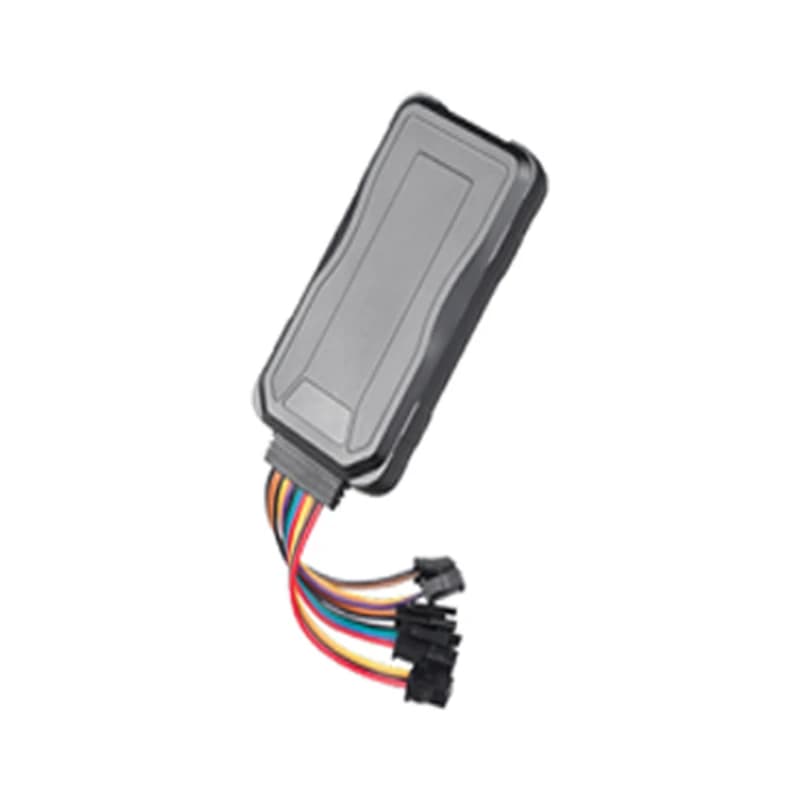
Grey Concox WeTrack 140 AIS 140 GPS tracker with coloured wires and plugs
10 slive update rate
9-36 Vvehicle power range
450 mAhbackup battery
2 + 2digital inputs and outputs
IP65dust and water rating
location · GPS + IRNSS
Fix GPS + IRNSSUpdate 10 s
01 · Live tracking · GNSS + eSIM

A new position every 10 seconds, from two satellite systems

The WeTrack 140 listens to GPS and to IRNSS, the Indian NavIC system, on the L1 and L5 bands. When it was on a moment ago, it gets a fix again in about 2 seconds. Each update carries the place, the speed and the angle the vehicle is facing. The tracker can hold two server addresses at once. Fleet Scanner draws every vehicle on its live map and keeps the full trail, so you can replay any trip later.

GPS IRNSS (NavIC) Speed Angle upload Primary 1 + Primary 2 server
Live vehicle tracking →
alarm · panic / SOSSOS
PanicPosition attached
02 · Panic button · SOS wire

A panic button the driver can reach

An AIS 140 tracker needs a way for a driver or passenger to call for help. On the WeTrack 140 this is the SOS button on its own cable. Hold it for 3 seconds. The tracker texts the saved SOS numbers, rings them up to 3 times until someone answers, and sends the alarm to the server. Fleet Scanner shows the alert at once, with the place on the map.

SOS button (3 s press) SOS SMS SOS call loop Platform alarm
Fleet alerts management software →
alarm · motionsleepmoving
VibrationACC OFF
03 · Movement alarms · Accelerometer

Vibration, movement and driving style

A motion sensor (accelerometer) sits inside the case. If a parked vehicle shakes several times, with the ignition off for 3 minutes, the tracker raises a vibration alarm. A movement alarm fires if the vehicle leaves its spot while the ignition is off. Both start switched off. The maker also lists driving behaviour analysis. Fleet Scanner turns these into alerts and adds them to its driver reports.

Vibration Movement (displacement) Driving behaviour Ignition on / off
Fleet alerts management software →
alarm · fence / speed
Zone Depot 1Over-speed
04 · Geofences and speed · Alarm list

Zone and over-speeding alarms

You can draw a zone on the map, such as a depot, a school or a mine gate. The WeTrack 140 has its own geofence alarm and an over-speeding alarm. Fleet Scanner lets you add as many zones and speed rules as you want on top. You choose who gets each alert and when, so a bus going too fast reaches the right person.

Geofence Over-speeding
Fleet geofencing software →
command · fuel cut
Cut-off ARMEDSpeed 0 km/h
05 · Remote cut-off · Relay output

Stop the fuel, with clear safety rules

The yellow wire drives a relay on the fuel pump line. Use a 12 V relay on a 12 V vehicle and a 24 V relay on a 24 V one. With the ignition off, the cut happens right away. With the ignition on, the tracker waits until it has a GPS fix and the speed is under 20 km/h. In Fleet Scanner, only approved users can send the cut or the restore.

Relay (yellow, pin 86) Oil / electricity cut Restore Center number
Vehicle and equipment protection →
inputs · ACC / door / ADCDIN1 Ignition ONAIN1 12.4 VDOUT1 Relay OFF
ACC ONDoor CLOSED
06 · Wires and sensors · Extension port

Ignition, door and analog sensor wires

The orange ACC wire tells the tracker when the engine is on. An extra input (IN1) watches a door, and an extra output (OUT1) can flash the lights or sound the horn to find the vehicle in a big car park. Two analog wires (ADC) read 0 to 30 V, so you can add a fuel level or temperature sensor. Fleet Scanner uses ignition for trips and engine hours and shows the sensor values in reports.

ACC Door (IN1) OUT1 ADC1 / ADC2 DOOR,1#
Trip planning and trip records →

WeTrack 140 specifications

Network2G GSM quad-band 850/900/1800/1900 MHz, GPRS Class 12, TCP
SIMeSIM with two network profiles
PositioningGPS and IRNSS (NavIC), L1 and L5 bands, 66 channels, hot start under 2 s
Power supply9 to 36 V DC, standby current under 7 mA
Backup battery450 mAh 3.7 V Li-Polymer, about 4 hours of working time
Inputs / outputsACC, door (IN1) and SOS inputs, two analog inputs (0 to 30 V), relay and OUT1 outputs
Memory and sensors32 + 64 MB flash, accelerometer
Size / rating98.5 x 52 x 15 mm, 80 g, IP65, -20 to +70 °C
CertificationAIS 140, ICAT approved, state empanelment varies
Fleet Scanner port10202 (TCP)

Specifications can differ between hardware revisions. Check the manufacturer’s datasheet for your exact unit.

How to connect the WeTrack 140 to Fleet Scanner

  1. Mount the WeTrack 140 face up under the front or rear windshield, or near the dashboard. Keep metal and heat-reflecting window film away from it. Connect red to battery plus through a 2 A fuse, black to ground and orange to the ignition (ACC). Fit the SOS button where the driver can reach it.
  2. For remote cut-off, wire the yellow line to pin 86 of the relay and put the relay in the fuel pump line. Add the door wire (IN1) and any fuel or temperature sensor on the analog wire (ADC) if you use them.
  3. Set the tracker’s server to your Fleet Scanner domain or IP address with port 10202. Use the server command from the WeTrack 140 command list. Then add the tracker in Fleet Scanner by its IMEI number and link it to a vehicle.
  4. Take a short drive and check the position and ignition on the live map. Hold the SOS button for 3 seconds to test the panic alert. If the tracker stays offline, send RESET# by SMS. It restarts after 20 seconds.

Concox WeTrack 140 FAQ

Does Fleet Scanner support the Concox WeTrack 140?

Yes. Fleet Scanner receives the WeTrack 140 on port 10202. It shows its position, ignition, panic button and other alarms, door and analog inputs, and it can send the fuel cut and restore commands.

Is the WeTrack 140 AIS 140 certified?

Yes. The maker lists it as ICAT approved to the AIS 140 standard, for commercial and passenger vehicles and RTO passing in India. Approval to sell it is also given state by state (empanelment). So check that it is empanelled in your state before you buy.

How do I connect the WeTrack 140 to my own tracking server?

Point the tracker to your Fleet Scanner domain or IP address and port 10202 with the server command from its command list. It can store two server addresses, called Primary 1 and Primary 2. Then add its IMEI number in Fleet Scanner.

What can the WeTrack 140 track?

It reports place, speed, angle and ignition, plus a door wire and two analog sensor wires. Its alarms cover the panic button, power cut, low battery, vibration, movement, geofence and over-speeding. With a relay, it can also cut the fuel.

How long does the WeTrack 140 battery last?

Its 450 mAh battery is only a backup for when vehicle power is lost. The maker’s spec sheet gives about 4 hours of working time on it. When power is cut, the tracker sends a power cut alarm, and a low battery alarm when the battery runs down.

Is the WeTrack 140 a 4G tracker?

No. It works on 2G GSM networks in four bands and sends data over GPRS. The SIM is an eSIM inside the device with two network profiles.

WeTrack 140 fitted. AIS 140 fleet on your own server.

From a single tracker to a mixed fleet across 1,000+ device models: live tracking, alerts, fuel, drivers, maintenance and reports in one self-hosted platform. See it with your own hardware.

Get a free demo

More supported GPS trackers

Specifications come from the WeTrack 140 product page, spec sheet and user manual on iconcox.in, published by Markon Electronics Corporation, which holds the ICAT AIS 140 approval for this model. Empanelment differs from state to state. Concox and WeTrack are trademarks of their owners.

Take Control with
Fleet Tracking

Track vehicles in real time, optimize routes, and take full control of your fleet operations.

Free Demo