Skip to content
Fleet Scanner
Hardware integration · Concox EG02

Concox EG02 e-bike GPS tracker, working inside Fleet Scanner

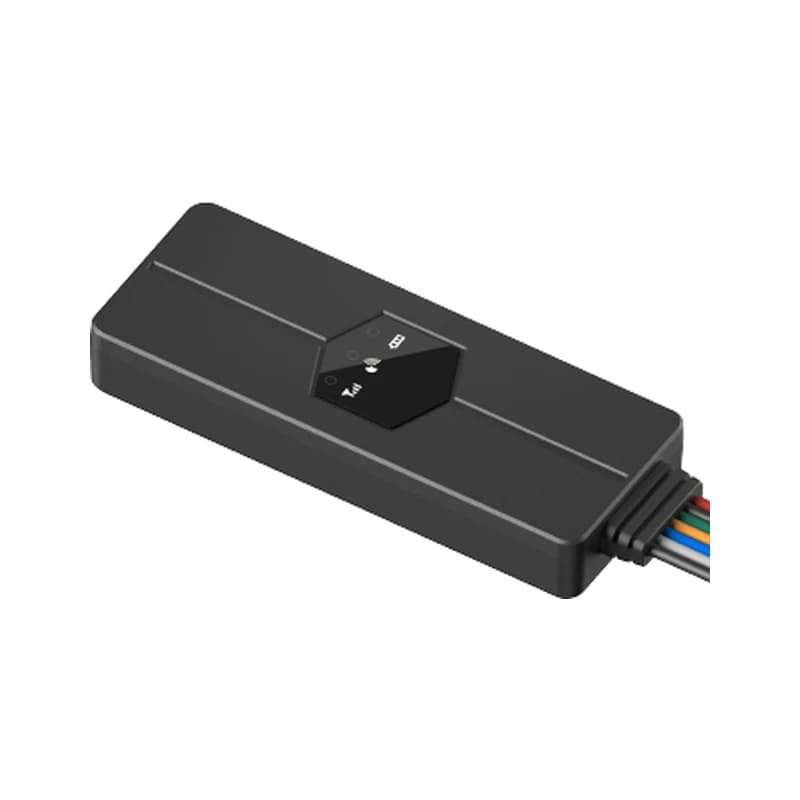
The Concox EG02 e-bike GPS tracker is a small anti-theft tracker for electric bikes and scooters, made by Jimi IoT. It plugs into the bike’s controller, so you do not need to cut wires. You can arm it, lock the wheel and start the bike with no key, from an app or by SMS. Fleet Scanner shows every bike on one map and passes on its alarms, all on your own server.

2G quad-band GSMGPS + LBS positioningPlug and play e-bike controllerPort 10224
Small black Concox EG02 e-bike GPS tracker with three status lights and a bundle of coloured wires
9 to 90 Vworking voltage
43 gdevice weight
270 mAhbackup battery
100-1,000 mmoving alarm radius
IPX5water resistance
location · 0x12
Bike ridingGPS FIXED
01 · Live tracking · GPS + LBS

Every e-bike on the live map

The EG02 finds its place with GPS. When the sky is blocked, it uses nearby mobile towers (LBS). It sends each point over the 2G network. You set two report gaps with TIMER,T1,T2#: one for when the bike is switched on and one for when it is off. Each can be 0 or 5 to 18,000 seconds, and both start at 20. Fleet Scanner draws each trip so you can play it back later.

0x01 Login0x12 Location packet TIMER,T1,T2# WHERE#
Live vehicle tracking →
command · keylock
Armed ONWheel LOCKED
02 · Arm and lock · Motor lock wire

Arm the bike and the wheel locks itself

Send KEYLOCK,ON# to arm the EG02 and KEYLOCK,OFF# to disarm it. While it is armed, the tracker locks the wheel if the bike moves when it should not. Jimi IoT says it also cuts the power when armed, so a thief cannot ride away. The blue motor lock wire goes to the bike’s controller to do this.

KEYLOCK,ON# KEYLOCK,OFF# Wheel lock Motor lock wire
Vehicle and equipment protection →
command · starACC12.6V
Power ONTrip #2
03 · Keyless start · Ignition wire

Switch the bike on without a key

Riders can switch the bike on from the app or by text. StarACC,ON# turns the power on and StarACC,OFF# turns it off. The orange wire tells the tracker when the bike is on. Fleet Scanner uses that on and off signal to split each day into separate trips.

StarACC,ON# StarACC,OFF# Ignition detection wire
Trip planning and trip records →
alarm · 0x16sleepmoving
VibrationBike parked
04 · Vibration alarm · Alarm packet

Shaken or pushed while parked? You hear about it

If the EG02 feels shaking several times in a row, it sends a vibration alarm. Turn it on with SENALM,ON,M,T#. M picks how the alarm is sent, by data, text or a call. T is the alarm time, from 3 to 600 seconds. Jimi IoT also lists speeding among its alerts. Fleet Scanner shows each alarm with the time and the place.

0x16 Alarm packet SENALM,ON,M,T# SENALM,OFF# Speeding
Fleet alerts management software →
alarm · moving
Radius 300 mMoved
05 · Moved and zones · Tracker + server

Know when a parked bike leaves its spot

The moving alarm draws a circle around a parked bike. Set it with MOVING,ON,R,M#, where R is the radius from 100 to 1,000 meters. It starts at 300 meters. If the bike goes past the edge, an alarm goes out. In Fleet Scanner you can also draw zones on the map, like a depot or a delivery area, and get told when a bike goes in or out.

MOVING,ON,R,M# MOVING,OFF# Zone in Zone out
Fleet geofencing software →
command · ling / findX -612Y 180Z 990
Horn ONFind 10 s
06 · Horn and find · External siren

A loud horn for thieves and for finding the bike

You can wire an external siren to the grey and black wires. Ling,A,B,C,D,T1,T2# picks when it sounds: on arm and disarm, when you search for the bike, on vibration and on a theft alarm. FIND,T# makes it sound so you can spot your bike in a full rack. T is 1 to 60 seconds, and 10 by default.

Ling,A,B,C,D,T1,T2# FIND,T# Horn wires
status · 0x1368%
Bike battery lowGSM online
07 · Power alarms · Status packet

Alarms for a cut wire or a flat bike battery

If someone cuts the tracker off from the bike’s power, it sends a power cut alarm (POWERALM). When the e-bike battery runs low, it sends a low battery alarm (BATALM). Jimi IoT also says the EG02 stops the bike battery from being drained or damaged. Fleet Scanner lists these alarms, so your team knows which bikes to check first.

0x13 Status / heartbeat POWERALM,ON,M# BATALM,ON,M#
Fleet reports and dashboards →

EG02 specifications

Network2G GSM quad-band 850/900/1800/1900 MHz, GPRS class 12, TCP (default) or UDP
PositioningGPS (L1 C/A, 66 channels) + LBS; < 2.5 m CEP; -165 dBm tracking, -148 dBm acquisition sensitivity
Time to first fixHot start 1 s or less, cold start 32 s or less (outdoors)
Power supply9 to 90 V DC, 8 mA at 36 V; the manual says it is for 36 V, 48 V or 72 V vehicles
Backup battery270 mAh / 3.7 V Li-Polymer; standby current 5 mA or less on battery
WiresPower +/-, ignition detection, wheel spin detection, motor lock, external horn +/-
LightsBlue: GPS, green: GSM, red: power
Memory64 MB
Size / weight77.0 x 29.0 x 13.0 mm, 43 g
EnvironmentIPX5, -20 to +70 °C
Fleet Scanner port10224 (TCP)

Specifications can differ between hardware revisions. Check the manufacturer’s datasheet for your exact unit.

How to connect the EG02 to Fleet Scanner

  1. Unscrew the back cover and slide a 2G SIM card with data (GPRS) and SMS into the slot. Close the cover again.
  2. Plug the power lead into the anti-theft power port on the e-bike controller, or onto the e-bike battery if there is no such port. Plug the 3-pin lead into the controller’s anti-theft port and the grey and black wires into the siren. If another alarm already uses that port, take it out first. Hide the tracker under plastic, such as inside the front cover or the headlight, with the side marked “THIS SIDE TOWARDS SKY” facing up.
  3. Point the EG02 at your Fleet Scanner server by text: SERVER,1,your-domain,10224,0# for a domain name, or SERVER,0,your-IP,10224,0# for an IP address. The manual has no APN command, so ask Jimi IoT or your dealer if the tracker does not go online. Set the report gaps with TIMER,T1,T2# and a center number with CENTER,A,number#.
  4. Add the EG02 in Fleet Scanner by its IMEI number and link it to the bike. When the blue light flashes slowly, GPS is fixed. Text WHERE# or PARAM# to check it, then arm it and make sure the bike shows on the map.

Concox EG02 FAQ

How do I connect a Concox EG02 to Fleet Scanner?

Text SERVER,1,your-domain,10224,0# to the tracker from your phone. After that, the EG02 sends to your own Fleet Scanner server on port 10224. Fleet Scanner shows each bike’s position, power on and off, and its vibration, moving, power cut and low battery alarms.

What SMS commands does the EG02 have?

The EG02 user manual (version 1.1) lists SERVER for the server, TIMER for the report gap, SOS and CENTER for phone numbers, KEYLOCK to arm, StarACC for keyless start, MOVING, SENALM, POWERALM and BATALM for alarms, Ling for the horn and FIND to sound it. PARAM#, STATUS# and WHERE# show settings, status and position.

What does the EG02 run on, and how long does its battery last?

It runs on the e-bike’s own battery and takes 9 to 90 V. It also has a small 270 mAh backup battery inside. Jimi IoT gives a standby current of 5 mA or less on that battery, but no battery life in hours. If the bike’s power is cut, the tracker sends an alarm.

Is the Concox EG02 still sold, and is it 4G?

Jimi IoT still lists the EG02 on its product site, with no end of life note. It uses 2G (GSM) only, not 4G. So check that 2G still works where the bikes ride. Fleet Scanner works with 1,000+ GPS devices, including 4G Jimi IoT trackers.

EG02 under the cover. Every e-bike on one map.

From a single tracker to a mixed fleet across 1,000+ device models: live tracking, alerts, fuel, drivers, maintenance and reports in one self-hosted platform. See it with your own hardware.

Get a free demo

More supported GPS trackers

SMS commands and wiring follow the Jimi IoT Intelligent E-Bike GPS Alarm EG02 user manual (version 1.1). Packet codes come from the GT06-family protocol that Jimi IoT trackers share. Concox, Jimi IoT and EG02 are trademarks of Jimi IoT. Specifications from the Jimi IoT EG02 product page and leaflet.

Take Control with
Fleet Tracking

Track vehicles in real time, optimize routes, and take full control of your fleet operations.

Free Demo