Skip to content
Fleet Scanner
Hardware integration · SEEWORLD S5E

SEEWORLD S5E GPS tracker, working inside Fleet Scanner

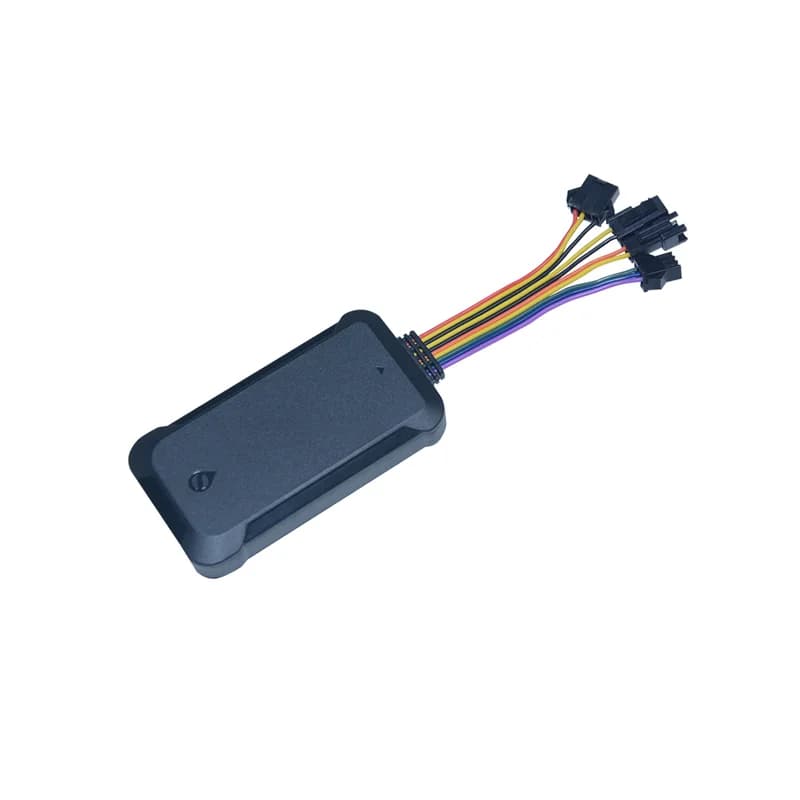
The SEEWORLD S5E GPS tracker is a wired 3G box for trucks, buses, rental cars and other transport vehicles. SEEWORLD gives it a separate SOS cable, so the driver can call for help with one press. It can also take a fuel sensor and a temperature sensor, and it can stop the fuel pump through a relay. Fleet Scanner shows where each S5E vehicle is, keeps its trips and sends you its alarms on the web and in the phone app.

3G + 2G WCDMA and GSM bandsGPS + BDS with LBS backupFuel + temp sensor wiresPort 11817
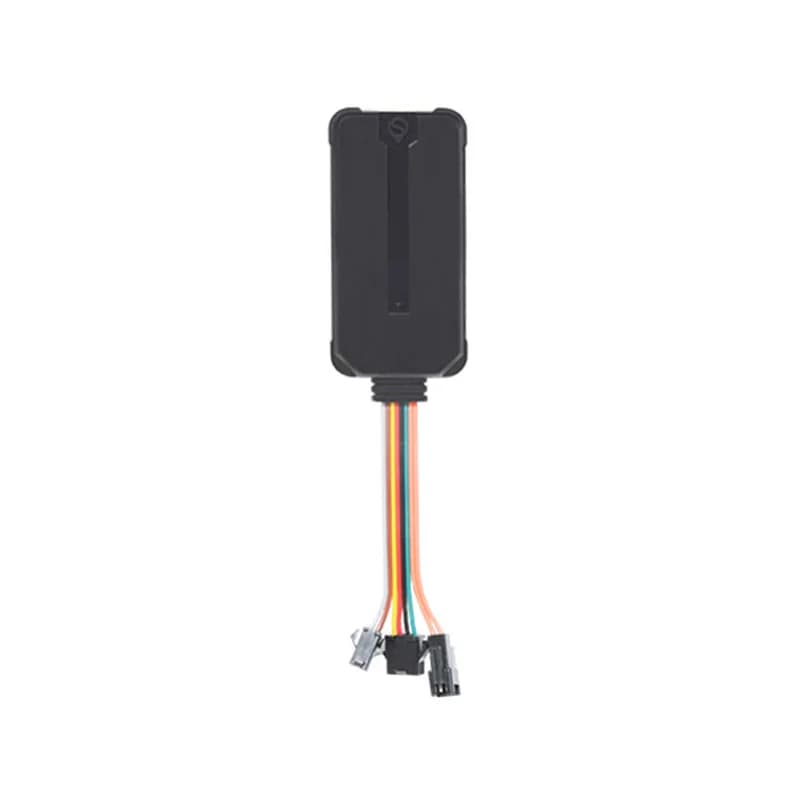
SEEWORLD S5E black vehicle GPS tracker with a bundle of coloured wires ending in three plugs
<10 mlocation accuracy
35 scold start fix
3SOS phone numbers
20 km/htop speed for a cut-off while driving
80 gweight
report · interval
Speed 72 km/hServer ONLINE
01 · Live tracking · GPRS reports

Reports by time, by distance and on every turn

The S5E can send its place on a fixed timer. It can also report each time it covers a set distance, or each time the vehicle turns. That keeps the line on the map close to the real road, even on twisty streets. Every trip lands in Fleet Scanner, and you can replay any past day on the map.

Time interval Distance Direction change Speed
Live GPS tracking →
gnss · gps / bds / lbs
Fix GPSAccuracy <10 m
02 · Positioning · GNSS + cell towers

GPS, BeiDou and phone towers to find the vehicle

SEEWORLD lists three ways for the S5E to find itself: GPS, BeiDou (BDS) satellites and nearby phone towers (LBS). AGPS and EPO data help it get a first fix faster. Inside a car park the tower fix is rough, but it still shows the area.

GPS BDS LBS AGPS EPO
alarm · sosSOS
SOSCalling number 1
03 · SOS and voice · SOS cable

Hold the SOS button and the tracker texts and calls for help

Keep a finger on SOS for 3 seconds and the S5E texts as many as 3 saved phone numbers. Then it rings them in turn, up to 3 rounds, until someone answers. The alarm goes to the platform as well. SEEWORLD also lists remote voice listening: ring the SIM card inside the S5E and it answers by itself, letting you listen to the cab. On the Fleet Scanner map, the SOS pops up at the spot where it was pressed.

SOS SMS SOS call loop Platform alarm Voice listening
Real-time fleet alerts →
alarm · tamperX -612Y 180Z 990
MovedIgnition OFF
04 · Theft and tamper alarms · Alarm reports

Shaking, moving, removal and cut power

SEEWORLD lists alarms for shaking, for the vehicle being moved and for the tracker being pulled off. Cutting the outside power sends an alarm too, and so does a low built-in battery. The shake alarm ships switched off. Once on, it fires after several bumps if the ignition stays off for 3 minutes. Fleet Scanner lets you pick who gets each alarm.

Vibration Displacement Removal Power cut Low battery
Vehicle and equipment protection →
alarm · fence / speed
Zone Depot AOver limit
05 · Zones and speeding · Alarm reports

Alerts when a vehicle leaves a zone or drives too fast

SEEWORLD lists geo-fence in and out alarms and speeding alarms for the S5E. Mark out depots, bus stations or customer yards as zones on the Fleet Scanner map. You set a speed limit for each vehicle or route. Then the right person gets a message on the web, by email or in the phone app.

Geo-fence in Geo-fence out Speeding
Geofencing software →
command · relay
Relay CUTSpeed 12 km/h
06 · Fuel and power cut-off · 4-pin relay

Stop a stolen vehicle without a crash risk

The S5E comes with a 4-pin relay for the fuel pump line. A cut sent while the ignition is off happens straight away. While the ignition is on, the S5E keeps the order on hold: first it needs a satellite fix, then a speed under 20 km/h. You can undo the cut the same way. Fleet Scanner keeps this button for the users you choose.

Cut fuel / power Restore fuel / power ACC state GPS fix check
Alerts and remote commands →
sensor · fuel / temp
Tank 47 %Load 4.2 °C
07 · Fuel and temperature · Sensor wires

Tank level and load temperature from two sensor wires

SEEWORLD says the S5E supports oil quantity and temperature detection. Its harness has one wire for a fuel sensor and one for a temperature sensor, and the box ships with a fuel cable. Fit the sensors and Fleet Scanner can chart the tank level and the temperature over each trip. It can flag a sudden fuel drop or a load that gets too warm.

Fuel sensor input Temperature sensor input Fuel cable
Fuel monitoring software →

S5E specifications

Network3G WCDMA 850/900/1900/2100 MHz and GSM 850/900/1800/1900 MHz (WCDMA, EDGE, GPRS)
PositioningGPS, BDS and LBS, with AGPS and EPO help
Location accuracyUnder 10 m
Cold startAbout 35 s
Power supply9 to 36 V DC, under 300 mA
Backup batteryBuilt in, with a battery switch that must be on for charging
WiringPower cord, SOS cable, fuel cable, 4-pin relay; fuel and temperature sensor wires
Status lightRed light: off means no power, 1 flash a second means connected to the server
Size / weight83 x 46 x 14.5 mm, 80 g
Working temperature-20 °C to +70 °C
Fleet Scanner port11817

Specifications can differ between hardware revisions. Check the manufacturer’s datasheet for your exact unit.

How to connect the S5E to Fleet Scanner

  1. Hide the S5E in the vehicle and connect the power cord, ground and ignition (ACC). Add the SOS cable within the driver’s reach, the relay on the fuel pump line and any fuel or temperature sensor.
  2. Insert a SIM with data and switch the battery switch on. The APN is set on its own in most countries; if yours is not, text APN,yourapn# to the tracker. Then text SERVER,1,yourdomain.com,11817,0# so it sends data to the Fleet Scanner server you host.
  3. Text SOS,A,number1,number2,number3# for the alarm numbers and TIMER,10# for the report interval. If you want to cut fuel by text, set one center number with CENTER,A,phone number# from an SOS phone.
  4. Add the S5E in Fleet Scanner with its IMEI and choose which truck or bus carries it. When the red light flashes once a second, it is online. Drive a few streets and look for the new trip.

SEEWORLD S5E FAQ

Can I use the SEEWORLD S5E with Fleet Scanner?

Yes. Send the S5E to port 11817 on the server where your Fleet Scanner runs. From there you get live tracking, trip history, SOS and tamper alarms, zones, fuel and temperature data and the remote fuel cut, all in one place.

Is the SEEWORLD S5E 3G or 4G?

The S5E is a 3G tracker. Its manual lists WCDMA bands plus GSM bands, so it can also use 2G. It has no 4G. Where your carrier has closed both 3G and 2G, the S5E will not get online. The S5E is still on SEEWORLD’s site, which also sells 4G trackers.

Which text messages set up the S5E?

From SEEWORLD’s manual: APN,yourapn# sets the APN, SERVER,1,domain,port,0# sets a server by domain (use 0 instead of 1 for an IP address), and TIMER,10# sets the upload interval. RESET# restarts the tracker about 20 seconds later.

How long does the S5E battery last?

SEEWORLD’s S5E pages list no battery size and no hours on battery. The manual does say the built-in battery only charges while its switch is on. With the switch off, the S5E turns off as soon as the vehicle power goes.

Can the S5E stop the engine?

It can cut the fuel or power through its relay. While the engine runs, nothing is cut before GPS locks on and the speed falls to less than 20 km/h. By text, only the one center number can send the cut, and only an SOS number can set that center number.

S5E fitted. SOS, fuel cut and sensors in one self-hosted system.

From a single tracker to a mixed fleet across 1,000+ device models: live tracking, alerts, fuel, drivers, maintenance and reports in one self-hosted platform. See it with your own hardware.

Get a free demo

More supported GPS trackers

Details from the SEEWORLD S5E product page and S5E user manual. Fuel and temperature data need the matching sensors. 3G and 2G coverage depends on your carrier. SEEWORLD and S5E are trademarks of Shenzhen SEEWORLD Technology.

Take Control with
Fleet Tracking

Track vehicles in real time, optimize routes, and take full control of your fleet operations.

Free Demo