Skip to content
Fleet Scanner
Hardware integration · Kingwo LT12

Kingwo LT12 4G container tracker, working inside Fleet Scanner

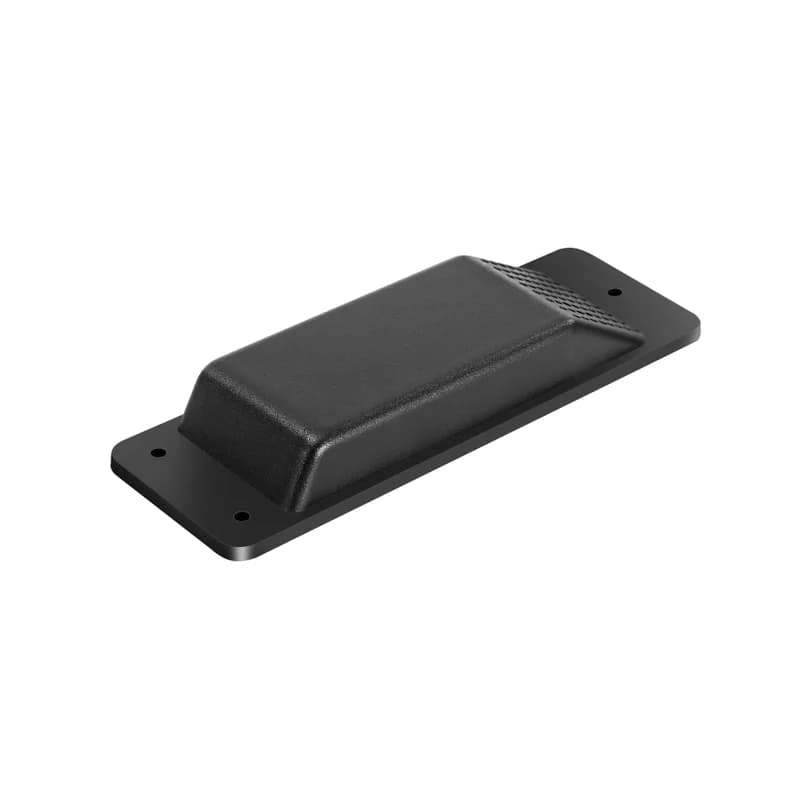
The Kingwo LT12 is a 4G container tracker from Kingwo IoT in Shenzhen, made to watch shipping containers and other assets for years without a charge. Its long black case looks like the air vent on a container wall, so it does not stand out once fitted. A large lithium battery powers it, and the IP67 case keeps out rain and dust. Fleet Scanner reads its positions, tamper alarms and sensor states, so each box sits on your live map with the rest of your fleet.

8,100 / 10,800 mAh by versionLTE Cat 1 + GSM 4G with 2GIP67 rain and dust proofPort 11003
Kingwo LT12 long black container tracker shaped like an air vent, with mounting tabs at each end
10,800 mAhbattery in the global LT12GL
< 15 µAcurrent draw while asleep
1,000reports saved while out of signal
6working modes to pick from
222.4 gweight of the tracker
gps · agps · l1
GNSS GPS + AGPSFix < 10 m
01 · Live tracking · GNSS engine

Where each container is, from port to depot

The LT12 finds itself with GPS on the L1 band, helped by AGPS so the first fix comes quicker. Kingwo gives an accuracy of under 10 m. In open sky a cold start takes about 35 seconds on average and a hot start about 2 seconds. Each report lands on the Fleet Scanner map. Put the reports together and you can replay the full trip a box made, from the port to the yard.

Position Time of fix Reports stored offline
Container and trailer tracking →
lbs · wi-fi 2.4 ghz
Source Wi-FiSite Warehouse B
02 · Indoor position · Cell towers and Wi-Fi

Cell tower and Wi-Fi positions when there is no sky

Stacked boxes and warehouses block satellite signals. For those spots the LT12 falls back on LBS, which means a rough position worked out from nearby cell towers. It also scans 2.4 GHz Wi-Fi, which Kingwo lists for tracking indoors. These spots are less exact than GPS, but they still tell you which site a container is at. Fleet Scanner shows them on the same map as normal fixes.

LBS (cell tower) position Wi-Fi scan
Live vehicle tracking →
li-socl2 · 3.6 v68%
Mode ClockBattery 81 %
03 · Battery life · Datasheet

Years of tracking from one lithium cell

Kingwo fits a 3.6 V lithium thionyl chloride battery: 8,100 mAh in the Asia version and 10,800 mAh in the global one. This kind of cell loses less than 1% of its charge a year in storage below 25 °C. The tracker draws under 15 µA asleep and under 100 mA awake. Kingwo says it runs for years thanks to its power saving modes. Fleet Scanner shows the level of each unit so you know which ones to swap.

Battery level Sleep and wake Working mode
Fleet reports and dashboards →
tamper · light sensorX -612Y 180Z 990
TamperLight detected
04 · Tamper alarm · Light sensor

A light sensor that raises the alarm on removal

Fitted in place, the LT12 sits in the dark. If someone pries it loose, light hits its sensor and it sends a tamper alarm straight away. Kingwo built this in to stop the tracker being taken off quietly. Fleet Scanner pushes the alarm to the people who need it, with the last known spot of that container, so someone can check the box before it goes far.

Tamper (light) Last position
Real-time fleet alerts →
g-sensor · motionsleepmoving
State STILLKnock none
05 · Movement · Motion sensor

Motion, knocks and crashes picked up by the G-sensor

A built-in motion sensor tells the LT12 when a container is moving and when it stands still. One of its six working modes, Motion and Static, uses this to report more while on the road and less while parked. Kingwo also lists vibration and collision alarms. Fleet Scanner logs each one with a time and place, so you can see if a box was hit or moved when it should not have been.

Moving or still Vibration alarm Collision alarm
Fleet asset management software →
geofence · enter / exit
Zone Port gateExit
06 · Zones · Geo-fence guard

Geo-fence guard for ports, yards and customer sites

Kingwo calls this feature Geo-fence Guard. You set up virtual zones and the LT12 reports when a container crosses the edge of one. In Fleet Scanner you can also draw your own zones around ports, depots and customer sites, as many as you need. Give each zone its own rule, so the right person hears when a box arrives or leaves.

Zone enter Zone exit
Fleet geofencing software →
temperature · on board
Temp 31 °CLimit 35 °C
07 · Temperature · Built-in sensor

An on-board temperature sensor

Next to the motion and light sensors, Kingwo lists a temperature sensor inside the LT12. It reads the air around the tracker itself, not a probe placed in the load. That still gives a sense of the heat a container sits in at a port or on a ship. Fleet Scanner keeps the reading with each report and can alert you when it goes past a limit you set.

Device temperature
Cold chain tracking →

LT12 specifications

NetworkLTE Cat 1 + GSM. LT12G (Asia): FDD LTE B1/B3/B5/B8, TDD LTE B34/B38/B39/B40/B41, GSM 900/1800 MHz. LT12GL (Global): FDD LTE B1/B2/B3/B4/B5/B7/B8/B12/B13/B18/B19/B20/B25/B26/B28/B66, TDD LTE B38/B39/B40/B41, GSM 850/900/1800/1900 MHz
PositioningGPS L1 1575.42 MHz, LBS, AGPS; under 10 m CEP; -162 dBm tracking, -148 dBm acquisition sensitivity
Time to first fixAverage cold start 35 s or less, hot start 2 s or less (open sky)
Wi-Fi2.4 GHz, for indoor tracking
BatteryLT12G: 8,100 mAh, LT12GL: 10,800 mAh, 3.6 V lithium thionyl chloride; under 1% self-discharge a year (stored below +25 °C)
Power3.6 V DC input; under 100 mA active, under 15 µA asleep
Working modesPeriodic, Clock, Week, Motion and Static, Warehouse, Tracking
SensorsMotion sensor (G-sensor), temperature sensor, light sensor
AlarmsTamper, vibration, collision; GPS failure, G-sensor failure, RTC failure
InterfaceCellular (red) and GNSS (green) lights, standard SIM, internal GNSS and cellular antennas, 1,000 reports offline storage
Setup and dataEmbedded TCP/IP; set up with itracksense, backend OTA, PC Tools or SMS; firmware updates over the air (FOTA)
Size / weight205 x 68 x 27 mm, 222.4 g, IP67
Environment-20 to +70 °C working, -40 to +85 °C storage, 5 to 95% humidity
Fleet Scanner port11003 (TCP)

Specifications can differ between hardware revisions. Check the manufacturer’s datasheet for your exact unit.

How to connect the LT12 to Fleet Scanner

  1. Pick the LT12G for Asia or the LT12GL for global use, then fit a standard size SIM with data that works on LTE Cat 1 or GSM along the route. Watch for the red cellular light and the green GNSS light to show it is working.
  2. Do the LT12 setup with Kingwo’s own tools: PC Tools, a backend OTA update, or SMS. Set the APN (your SIM’s internet settings), then your Fleet Scanner server address and port 11003. Kingwo does not post the SMS commands on its site, so ask Kingwo or your seller for the LT12 manual.
  3. Choose a working mode that suits the trip, such as Periodic, Clock, Week, Motion and Static, Warehouse or Tracking. Fewer reports leave more battery. In Fleet Scanner, add the unit by its IMEI and link it to the container.
  4. Fit the tracker on the container where it blends in like an air vent, so that pulling it off lets in light and sets off the tamper alarm. Leave it in open sky for a few minutes and wait for the first position on the map.

Kingwo LT12 FAQ

Does Fleet Scanner work with the Kingwo LT12?

Yes. Traccar’s public device list puts the LT12 in the upro protocol family, and Fleet Scanner takes it on port 11003. Add it by IMEI to see its positions, battery, tamper alarms and sensor states on the map, in alerts and in reports.

How long does the LT12 battery last?

Kingwo says years, from its power saving modes and a large lithium cell. It does not give a set number of days, because life depends on the working mode and how often it reports. The global LT12GL has 10,800 mAh and the Asia LT12G has 8,100 mAh.

Where can I find the LT12 SMS commands and manual?

Kingwo’s site has the LT12 datasheet and a product catalog, but not a user manual or a list of SMS commands. Kingwo says the LT12 can be set up over SMS, PC Tools or a backend OTA update, so ask Kingwo or your seller for the manual. Use port 11003 for Fleet Scanner.

Is the Kingwo LT12 a 4G tracker?

Yes. It uses LTE Cat 1 and drops to GSM (2G) where 4G is missing. There are two versions: the LT12G covers bands used in Asia, and the LT12GL covers a wider set of bands for global use. Check the band list against your SIM’s network before you buy.

Is the LT12 a current Kingwo product?

Yes. Kingwo IoT lists the LT12 under its container trackers, and Kingwo put the LT12 datasheet on its site in January 2026. Kingwo sells it for container and asset tracking rather than as a wired vehicle tracker.

LT12 on the container. Every box on one map for years.

From a single tracker to a mixed fleet across 1,000+ device models: live tracking, alerts, fuel, drivers, maintenance and reports in one self-hosted platform. See it with your own hardware.

Get a free demo

More supported GPS trackers

Specifications from the Kingwo IoT LT12 product page and the LT12 datasheet (posted January 2026). Traccar’s public device list places the LT12 in the upro protocol family. Battery life depends on the working mode, report rate and signal. Kingwo and LT12 are trademarks of Shenzhen Kingwo IoT Co., Ltd.

Take Control with
Fleet Tracking

Track vehicles in real time, optimize routes, and take full control of your fleet operations.

Free Demo