Skip to content
Fleet Scanner
Hardware integration · Kingwo MT100

Kingwo MT100 GPS tracker, working inside Fleet Scanner

The Kingwo MT100 GPS tracker is a small, low-cost 2G box from Shenzhen Kingwo IoT for basic fleet tracking. It weighs 45 g and takes any vehicle power from 9 to 100 V. It reads the ignition wire, spots harsh driving with a motion sensor and keeps up to 1,000 points when there is no signal. Point it at your own Fleet Scanner server and every car, van or bike shows on one live map.

2G GSM 850/900/1800/1900GPS + LBS with AGPS2 in · 1 out ignition, A/C, relayPort 11003
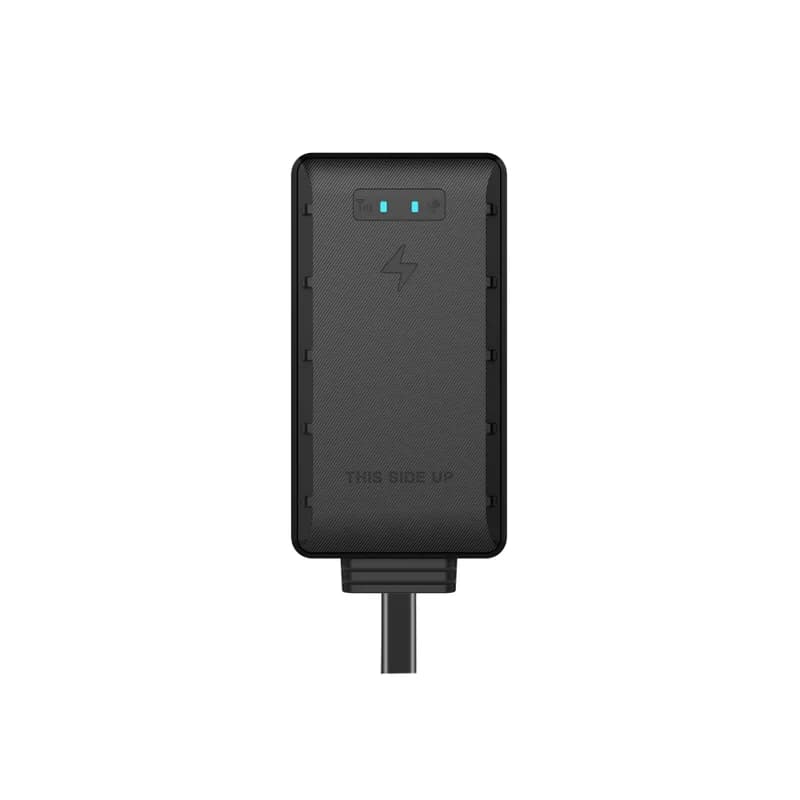
Kingwo MT100 GPS tracker, a slim black box with two small status lights, THIS SIDE UP printed on the front and one cable coming out of the bottom
9 to 100 Vvehicle power input
1,000points kept with no signal
-162 dBmGPS tracking sensitivity
60 mAhbackup battery
45 gweight
gps · live map
Speed 52 km/hGPS FIX
01 · Live tracking · GPS + AGPS

MT100 live tracking and route playback

The MT100 uses a 50 channel GPS receiver with AGPS, which helps it find its place faster after it wakes. Kingwo gives an average hot start of 2 seconds or less and 5 m accuracy (CEP). The tracker switches by itself between a moving mode and a parked mode. If it loses the network, it saves up to 1,000 points and sends them later, so the trip has no gaps. Fleet Scanner shows each vehicle live and keeps every route for replay.

Live position History playback Motion / static auto-switch 1,000 offline points
Live vehicle tracking →
lbs · towers
LBS roughGPS no sky
02 · Backup location · LBS

Tower location for car parks and tunnels

Satellites are hard to see from under a roof. In a covered car park or a tunnel, the MT100 can fall back on LBS, which works out a rough spot from the mobile towers around it. Kingwo also lists a GPS failure alarm, so you hear about it when the GPS part stops working. In Fleet Scanner the vehicle stays on the map in the right area until a sharp GPS fix comes back.

LBS position GPS failure alarm AGPS assist
input · ACC / A/CDIN1 Ignition ONAIN1 12.4 VDOUT1 Relay OFF
ACC ONA/C on
03 · Ignition and inputs · 2 inputs + 1 output

Ignition, air conditioning and a relay output

One wire goes to the ACC line, so the MT100 knows when the key is on and the engine is running. A second input tells whether the air conditioning is on. There is also one digital output for a relay. Kingwo does not say in its public papers what the relay should switch or how to trigger it, so check with Kingwo before you wire it. Fleet Scanner turns key on and key off into trips and engine hours.

Ignition (ACC) input Air conditioning input Relay output
Trip planning and trip records →
g-sensor · behaviourA3 41 9F 00
Braking harshCollision none
04 · Driving behaviour · G-sensor

Harsh driving and crash alerts from the G-sensor

A G-sensor inside the MT100 feels how the vehicle moves. Kingwo lists four driving events: sudden speed up, sudden braking, sharp turns and collisions. A collision also raises its own alarm. If the sensor itself stops working, there is a G-sensor failure alarm too. In Fleet Scanner these events add up in each driver’s record, so you can see who drives hard.

Sudden acceleration Sudden deceleration Sharp turn Collision alarm G-sensor failure
Driver management software →
alarm · moved / speed
Moved yesLimit 80 km/h
05 · Movement and speed · Tracker + server

Alarms when a parked car moves or a driver speeds

Kingwo lists a displacement alarm, which goes off when a vehicle moves away from where it was left. It also lists a speeding alarm for going over a set speed. Fleet Scanner adds zones on top of this. Draw a circle or a shape round a depot, a rental lot or a customer’s site, and get an alert each time a vehicle goes in or out.

Displacement alarm Speeding alarm Server zones in / out
Fleet geofencing software →
alarm · power cut12.6V
Main power cutBackup 60 mAh
06 · Power and tamper · Main power + battery

Wide voltage, a cut wire alarm and a small backup cell

The MT100 takes 9 to 100 V DC, and Kingwo shows it on fleet trucks, rental cars and motorbikes. Kingwo adds 200 V reverse connection protection in case the wires go on the wrong way round. The tracker watches the main power voltage. It sends a power cut alarm if someone pulls the wires and a low voltage alarm when the vehicle battery runs low. A small 60 mAh rechargeable cell sits inside as a backup. Fleet Scanner puts these in the alert list with the time and place.

Power cut alarm Low voltage alarm Main power voltage 200 V reverse protection
Fleet alerts management software →

MT100 specifications

Network2G GSM/GPRS, 850/900/1800/1900 MHz
PositioningGPS plus LBS, with AGPS, 50 channels, GPS L1 1575.42 MHz
Accuracy5 to 10 m (5 m CEP)
GPS sensitivity-162 dBm tracking, -148 dBm acquisition
Time to first fixAverage cold start 35 s or less, hot start 2 s or less (open sky)
Power input9 to 100 V DC, 200 V reverse connection protection
Backup battery60 mAh 3.6 V rechargeable Li-poly
Current drawUnder 30 mA working, under 5 mA asleep (at 12 V DC)
Inputs / outputs2 digital inputs (ignition, air conditioning), 1 digital output (relay)
Connector2-pin, 4-pin or 5-pin
AntennasInside the case, GNSS and cellular
SIM / memoryMicro-SIM; 1,000 offline points
LightsRed for cellular, green for GNSS
Size / weight75 x 40 x 14.5 mm, 45 g
EnvironmentWorks at -30 to +80 °C, stored at -40 to +85 °C, 5% to 95% humidity, IP54 (product page)
SetupiTrackSense platform, backend OTA, PC tools, SMS; two servers over two links
ProtocolUpro family (Traccar device list)
Fleet Scanner port11003

Specifications can differ between hardware revisions. Check the manufacturer’s datasheet for your exact unit.

How to connect the MT100 to Fleet Scanner

  1. Get a Micro-SIM that works on 2G and has GPRS data and SMS turned on. Check that a 2G network still runs where your vehicles go. Write down the IMEI of the tracker and the plate of the vehicle it will sit in.
  2. Fit the MT100 with the THIS SIDE UP label on the front facing up. Its GNSS and cellular antennas are inside the case, so there are no outside antennas to place. Connect power to anything from 9 to 100 V DC and the ignition input to the ACC line. Add the air conditioning input or the relay only if you need them, and ask Kingwo which wire on your 2, 4 or 5 pin plug does what.
  3. Kingwo lists four ways to set up the MT100: its iTrackSense platform, backend OTA, PC tools and SMS. The MT100 manual and its SMS command list are not on the website, so request them from Kingwo or from the shop you bought from. Use them to set your SIM’s APN, your Fleet Scanner server IP or domain, and port 11003.
  4. In Fleet Scanner, add the tracker by its IMEI and link it to the vehicle. The red light shows the cellular network and the green one shows GNSS. Then turn the key, take a short drive and check that the ignition change and the route show on the live map.

Kingwo MT100 FAQ

How do I connect the Kingwo MT100 to my own tracking server?

Set three things on the tracker: the APN of your SIM, your Fleet Scanner server address and port 11003. Kingwo says the MT100 can be set up by SMS, by PC tools, over the air or from its iTrackSense platform. It can also report to two servers over two links, according to Kingwo.

Where can I find the Kingwo MT100 manual and SMS commands?

The product page on kingwoiot.com links only the MT100 datasheet and the full product catalog. There is no public user manual or SMS command list there. Kingwo’s FAQ page says a user manual comes with each delivery and its support team can help, so request the command list from them or from your supplier.

What can the MT100 GPS tracker track?

Position by GPS, with tower location when GPS is blocked, plus routes for playback. It also reads the ignition and the air conditioning. It raises alarms for power cuts, low voltage, moving while parked, speeding, collisions, GPS failure and G-sensor failure, and it logs harsh speed ups, harsh braking and sharp turns.

How long does the Kingwo MT100 battery last?

Kingwo gives no hours. The MT100 is wired to the vehicle and lives on its power. The 60 mAh battery is only a small backup inside the case. On vehicle power it draws under 30 mA while working and under 5 mA asleep.

Can I use the MT100 on a truck or a motorbike?

Yes. Kingwo shows it for fleet trucks, rental cars and motorbikes. The 9 to 100 V input covers both 12 V and 24 V vehicles. The product page gives the case an IP54 rating.

Is the Kingwo MT100 still sold, and is it 4G?

Yes. The MT100 is still on kingwoiot.com, and the datasheet on that site went up in January 2026. It is 2G only, with no 4G. Kingwo sells 4G vehicle trackers on the same site, but does not name one as the MT100’s replacement. Traccar’s device list puts the MT100 in the Upro protocol family.

MT100 behind the dash. Every vehicle on your own map.

From a single tracker to a mixed fleet across 1,000+ device models: live tracking, alerts, fuel, drivers, maintenance and reports in one self-hosted platform. See it with your own hardware.

Get a free demo

More supported GPS trackers

Specs come from Kingwo IoT’s MT100 product page on kingwoiot.com, the MT100 datasheet and the 2026 product catalog it links. The working temperature, humidity and IP54 rating appear only on the product page. Traccar’s public device list gives the protocol family. Kingwo is a trademark of Shenzhen Kingwo IoT Co., Ltd.

Take Control with
Fleet Tracking

Track vehicles in real time, optimize routes, and take full control of your fleet operations.

Free Demo