Skip to content
Fleet Scanner
Hardware integration · Queclink GL300

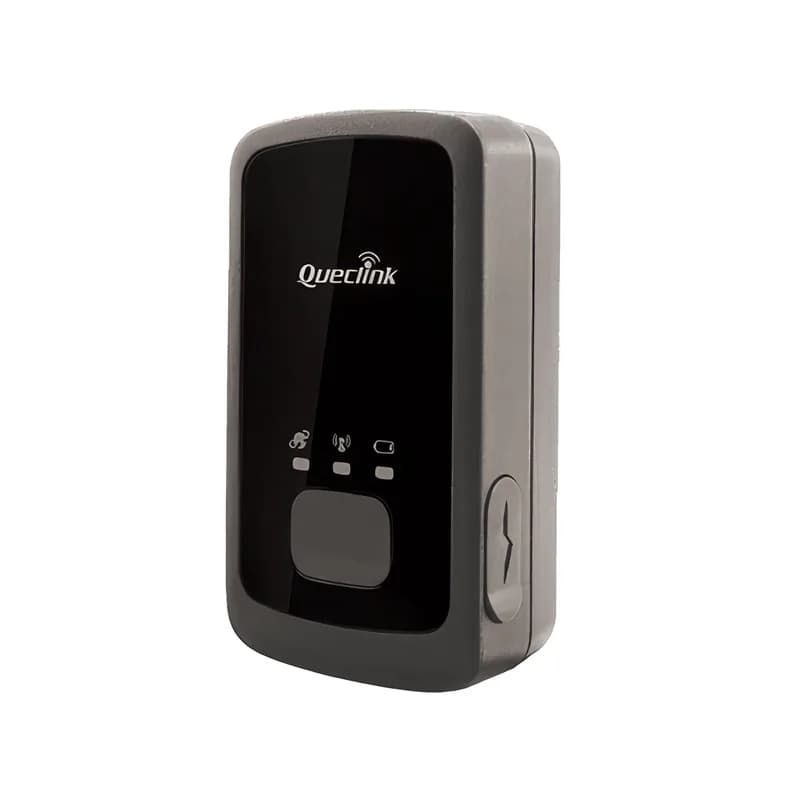
Queclink GL300 portable tracker, working inside Fleet Scanner

The Queclink GL300 GPS tracker is small enough for a pocket and runs on its own battery. You can use it for trailers, equipment, parcels and lone workers. It uses Queclink’s @Track protocol (the language it uses to send data). Fleet Scanner reads every report: timed positions, SOS, geofences, motion and battery events. So your portable assets sit on the same map as your vehicles.

1300 mAh internal batteryu-blox M8 GPS + GLONASS@Track text protocolPort 11604
Queclink GL300 portable battery-powered GPS tracker
140 hat 5-minute reports
400 hstandby
5device geofences
60 gweight
2.5 mGNSS accuracy (CEP)
report · GTFRI
Report every 5 minGPS FIXED
01 · Scheduled positions · @Track reports

Reports on a timer and location when you ask

The GL300 sends its position as often as you choose, for example every 5 minutes. It also sends its location when you ask for it. And it sends a first position after it is switched on. Fleet Scanner shows each portable asset live. It keeps its movement history, just like a vehicle.

GTFRI Fixed reportGTRTL Real-time locationGTPNL First fix after power onGTLBC Location by call
Fleet asset management software →
motion · GTSTTsleepmoving
State MOVINGStill 3 h 10 m
02 · Motion-based reporting · Accelerometer

Sleeps when still, reports when it moves

The GL300 has a 3-axis motion sensor (accelerometer). It reports when the tracker starts moving and when it stops. It also reports when it has been still for a long time. Fleet Scanner uses these events to show when a trailer or tool left the yard. In between moves, the tracker saves battery.

GTSTT Motion stateGTNMR Non-movement
alarm · GTSOSSOS
SOSPosition attached
03 · SOS for lone workers · Button

One-press SOS with the worker’s position

Press the SOS button and the GL300 sends an alarm with its current position. The tracker shakes (vibrates) to show the alarm was sent. Fleet Scanner sends an instant alert to supervisors. So a lone worker or driver can call for help without a phone.

GTSOS SOS alarm
Real-time fleet alerts →
geofence · GTGEO
Zone YardExit
04 · Geofences · @Track reports

Geofences on the tracker and in Fleet Scanner for every site

A geofence is a zone you draw on the map. The GL300 can hold up to five geofences of its own. These keep working even between reports. Fleet Scanner adds as many more zones as you like on its side. Either way, you know when an asset leaves the yard or reaches a customer site.

GTGEO Geofence reportGTGCR Geofence by commandGTSWG Geofence by button
Geofence alerts for vehicles →
battery · GTBPL68%
Battery 68 %Charging no
05 · Battery and charging · @Track events

Battery level, charging and low-battery warnings

The GL300 tells you when its battery is low. It reports when charging starts and stops. It also reports when outside power is plugged in or removed. Fleet Scanner shows the battery level of every portable tracker. It warns you before one goes offline.

GTBPL Battery lowGTBTC/GTSTC Charging start/stopGTEPN/GTEPF External power on/offGTINF Device info
Fleet reports and dashboards →
alarm · GTSPDX -612Y 180Z 990
Speed 96 km/h
06 · Speed and temperature · @Track events

Speed alarm and temperature alarm

Set a speed limit on the tracker. It then reports when the limit is broken. The temperature alarm reports when the device gets too hot or too cold. Fleet Scanner saves both with the asset and sends you the alert.

GTSPD Speed alarmGTTEM Temperature alarm
inputs · GTDISDIN1 Ignition ONAIN1 12.4 VDOUT1 Relay OFF
Ignition ON
07 · Inputs and ignition · 2 digital inputs

Two inputs for ignition or an alarm switch

You can add an optional cable. Then one input can sense ignition (engine on or off). The other input can sense a switch or an alarm. Fleet Scanner then saves where the ignition was turned on and off. This works for a vehicle or machine that has no wired tracker.

GTDIS Input changeGTIGL Ignition locationGTIGN/GTIGF Ignition on/off
cells · GTGSM
Cells 3Jamming none
08 · Cell-tower data and health · @Track events

Cell-tower location, jamming and power events

Cell tower reports help find the tracker indoors, where GPS is weak. Other reports explain any gap in tracking. They cover jamming (someone blocking the signal), power on and off, and the watchdog (a built-in self check). Fleet Scanner keeps all of it in the device history.

GTGSM Cell infoGTJDS/GTJDR JammingGTPNA/GTPFA Power on/offGTDOG Watchdog

GL300 specifications

Network2G GSM/GPRS quad-band 850/900/1800/1900 MHz (LTE Cat-M1/NB-IoT in the GL300MA/ME series)
GNSSu-blox M8, 72 channels, GPS + GLONASS, A-GPS; 2.5 m CEP
Battery1300 mAh Li-Polymer, charged by Mini USB at 5 V
Battery lifeAbout 400 h standby, 140 h at 5-minute and 180 h at 10-minute reporting
Inputs2 digital inputs (ignition and alarm switch), no outputs
Sensors3-axis accelerometer, SOS button with vibration feedback
Size / weight68.5 x 38.5 x 23.5 mm, 60 g, IPX5
ProtocolQueclink @Track, over TCP, UDP or SMS
Fleet Scanner port11604

Specifications can differ between hardware revisions. Check the manufacturer’s datasheet for your exact unit.

How to connect the GL300 to Fleet Scanner

  1. Charge the GL300 fully and put in a data SIM card.
  2. Use the Queclink configuration tool or SMS commands. Set the APN (your SIM’s internet settings), your Fleet Scanner server’s domain or IP and port 11604. Pick a report interval that suits the battery life you need.
  3. In Fleet Scanner, add the tracker by its IMEI number. Assign it to an asset, a trailer or a person.
  4. Put it in the asset, in a hidden spot with a clear view of the sky. Then check the first positions on the map.

Queclink GL300 FAQ

Does Fleet Scanner support the Queclink GL300?

Yes. Fleet Scanner reads the GL300’s @Track reports. These include timed positions, SOS, geofences, motion, battery, charging and input events. It reports on port 11604.

How long does the GL300 battery last?

The battery is 1300 mAh. Queclink says it lasts about 140 hours with a report every 5 minutes. It lasts about 180 hours with a report every 10 minutes, and around 400 hours on standby. Fleet Scanner shows the battery level and warns you before it runs out.

Can I use the GL300 in a vehicle?

Yes. With the optional cable, it can sense ignition. But a wired tracker such as the Teltonika FMB920 or FMC130 is still better for vehicles. It always has power, and it has outputs for an immobiliser (engine block).

Is the GL300 waterproof?

The GL300 is rated IPX5, so it can handle splashes and rain. For trailers and containers, put it in a sheltered spot inside the asset.

GL300 switched on. Assets on the same map as your fleet.

From a single tracker to a mixed fleet across 1,000+ device models: live tracking, alerts, fuel, drivers, maintenance and reports in one self-hosted platform. See it with your own hardware.

Get a free demo

More supported GPS trackers

Report types follow the Queclink GL300 @Track Air Interface Protocol. Battery figures are Queclink’s ratings and depend on settings and signal. Queclink and GL300 are trademarks of Queclink Wireless Solutions.

Take Control with
Fleet Tracking

Track vehicles in real time, optimize routes, and take full control of your fleet operations.

Free Demo