Skip to content
Fleet Scanner
Hardware integration · Queclink GV75

Queclink GV75 rugged tracker, working inside Fleet Scanner

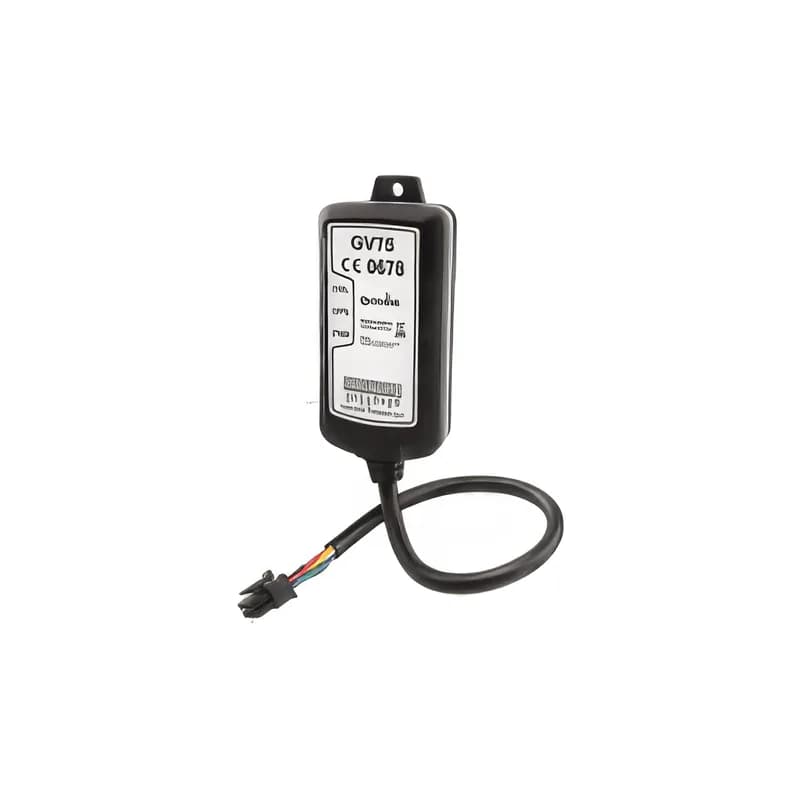
The Queclink GV75 GPS tracker is a waterproof IP67 vehicle tracker. It is built for motorbikes, boats, construction equipment and anything out in the weather. It comes in three versions: 2G, 3G (GV75W) and LTE-M (GV75MG). LTE-M is a low-power 4G network for small devices. The GV75 reports over Queclink’s @Track protocol. Fleet Scanner reads it and turns it into live tracking, alerts and reports.

IP67 waterproof8–32 V wide supply2G · 3G · LTE-M versions@Track protocol
Queclink GV75 waterproof IP67 GPS tracker with cable
IP67waterproof housing
8–32 Vsupply range
20device geofences
3network versions
-30 to 80 °Coperating range
report · GTFRI
Report every 30 sGPS FIXED
01 · Live tracking · @Track reports

Position reports on a timer from a sealed box

The GV75 sends its position as often as you choose. It sits in a sealed IP67 box. You can fit it outside a cab, on a motorbike or on equipment. Fleet Scanner shows each unit live and keeps its full history.

GTFRI Fixed reportGTINF Device info
GPS fleet tracking software →
ignition · GTIGNsleepmoving
Engine 3,118 h
02 · Ignition and trips · Ignition input

Ignition on and off for trips and engine hours

The GV75 has its own ignition input. It reports when the engine starts and stops. Fleet Scanner uses this to split trips and count engine hours on machines. It also shows how much each vehicle or site is used.

GTIGN Ignition onGTIGF Ignition off
Trip planning and trip records →
behaviour · GTHBMX -612Y 180Z 990
Harsh braking
03 · Driving behaviour · Accelerometer

Harsh braking, acceleration, cornering and speed

The 3-axis motion sensor (accelerometer) reports harsh braking, acceleration and cornering. A speed alarm reports when a speed limit is broken. Fleet Scanner turns them into driver scores and safety alerts.

GTHBM Harsh behaviourGTSPD Speed alarm
Driver scorecards →
geofence · GTGEO
Zone Site 4Exit
04 · Geofences · @Track reports

Up to 20 geofences on the device

A geofence is a zone you draw on the map. The GV75 holds up to 20 geofences of its own. It reports when it enters or leaves one. Fleet Scanner adds as many more zones as you like on its side. Use them for sites, yards and customer locations.

GTGEO Geofence report
Fleet geofencing software →
inputs · GTDISDIN1 Ignition ONAIN1 12.4 VDOUT1 Relay OFF
Input ACTIVEOUT1 OFF
05 · Inputs and outputs · I/O

Alarm input and outputs for an immobiliser (engine block)

Besides ignition, a negative input can carry a panic button or a door switch. There are also two outputs, and one of them is latched, which means it stays in place until changed. They can drive a siren or a starter-cut relay. That relay is a switch that stops the engine from starting. You switch the outputs over the air from Fleet Scanner.

GTDIS Input change OUT1 (latched) OUT2
Vehicle and equipment protection →
power · GTPNA12.6V
Supply 24.6 V
06 · Power and battery · @Track events

Power on and off and low battery alerts

The GV75 reports when its power goes on and off. It also sends a low battery alert. These explain any gap in tracking. Fleet Scanner keeps them in the device history, next to the power voltage.

GTPNA/GTPFA Power on/offGTBPL Battery low
Fleet reports and dashboards →

GV75 specifications

VersionsGV75 (2G GSM), GV75W (3G UMTS + GSM), GV75MG (LTE Cat-M1/NB + EGPRS)
GNSSu-blox GPS
Power supply8 to 32 V DC
Inputs / outputsIgnition input and an alarm input; two outputs, one latched (per the GV75MG manual)
Sensors3-axis accelerometer for driving behaviour, motion and power saving
GeofencesUp to 20 on the device
Size / rating102 x 46 x 20.5 mm, IP67, -30 to +80 °C
ProtocolQueclink @Track, over TCP, UDP or SMS
Fleet Scanner port11612

Specifications can differ between hardware revisions. Check the manufacturer’s datasheet for your exact unit.

How to connect the GV75 to Fleet Scanner

  1. Fit the GV75 with the label facing the sky. Connect power, ground and the ignition wire. Also connect the alarm input and outputs if you use them.
  2. Put in a SIM that matches your version (2G, 3G or LTE-M). Use the Queclink tool or SMS commands. Set the APN (your SIM’s internet settings), your Fleet Scanner server’s domain or IP and port 11612.
  3. In Fleet Scanner, add the tracker by its IMEI number. Assign it to a vehicle or machine.
  4. Start the engine and take a short drive. Check the ignition and position on the live map.

Queclink GV75 FAQ

Does Fleet Scanner support the Queclink GV75?

Yes. Fleet Scanner reads the GV75’s @Track reports. These cover position, ignition, harsh driving, speed, geofences, inputs and power. It reports on port 11612.

Is the GV75 waterproof?

Yes. The GV75 is rated IP67. So you can fit it on motorbikes, boats and construction equipment that get rain and washing.

Which GV75 version should I choose?

Pick by network. Choose the GV75 for 2G, the GV75W for 3G and the GV75MG for LTE Cat-M1/NB-IoT. Some countries are switching off 2G and 3G. There, the GV75MG is the safe choice.

Can the GV75 immobilise a vehicle?

Yes, with a relay on one of its outputs. A relay is a switch that can stop the engine from starting. Fleet Scanner switches the output over the air. Only approved users can do this.

GV75 installed. Rugged assets on one platform.

From a single tracker to a mixed fleet across 1,000+ device models: live tracking, alerts, fuel, drivers, maintenance and reports in one self-hosted platform. See it with your own hardware.

Get a free demo

More supported GPS trackers

Report types follow Queclink’s @Track protocol; exact messages and I/O differ between GV75 versions. Queclink and GV75 are trademarks of Queclink Wireless Solutions.

Take Control with
Fleet Tracking

Track vehicles in real time, optimize routes, and take full control of your fleet operations.

Free Demo