Skip to content
Fleet Scanner
Hardware integration · Queclink GV500

Queclink GV500 OBD tracker, working inside Fleet Scanner

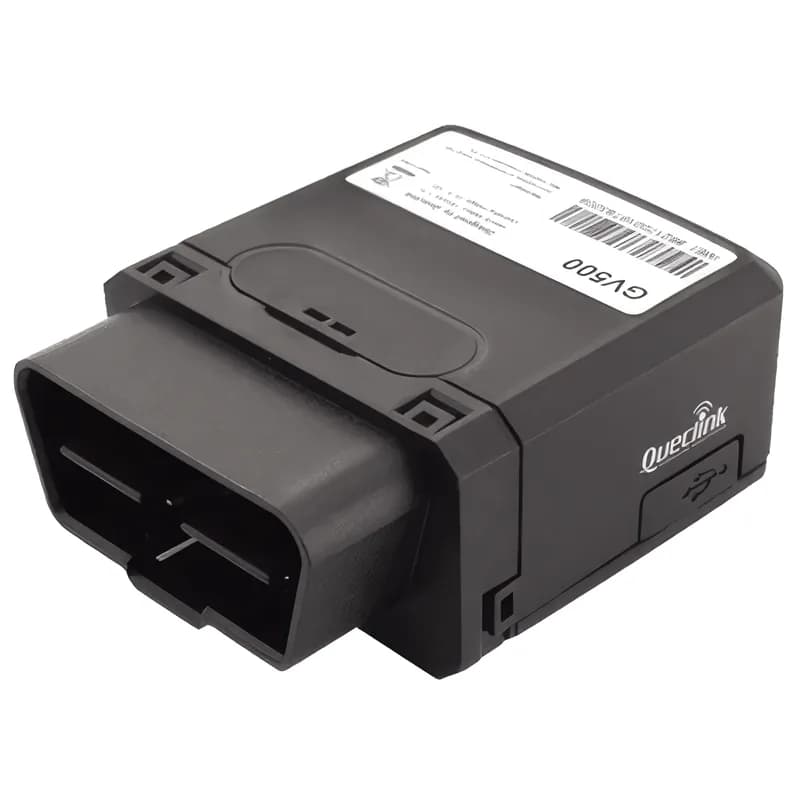
The Queclink GV500 OBD tracker plugs straight into a vehicle’s OBD-II port. That is the vehicle’s diagnostic plug. You need no wiring and no installer. The GV500 reports position, ignition and engine data. Engine data means RPM, speed, coolant temperature, fuel level, mileage and fault codes. It sends all this over Queclink’s @Track protocol. Fleet Scanner turns it into live tracking, maintenance alerts and driver scores.

OBD-II plug and playu-blox GNSS with A-GPS@Track text protocolPort 11612
Queclink GV500 OBD-II plug-in GPS tracker
0wires to install
9OBD and CAN protocols
8–32 Vfrom the OBD port
35+@Track report types
VINread automatically
report · GTFRI
Speed 61 km/hRPM 2,050
01 · Live tracking · @Track reports

Position, speed and engine data in every report

The GV500 sends regular timed reports. Each one has the position and speed. It also has engine RPM, fuel used and fuel level. Fleet Scanner shows each vehicle live. It saves every trip so you can play it back.

GTFRI Fixed reportGTRTL Real-time locationGTIGL Ignition location
GPS fleet tracking software →
obd · GTOBD
Coolant 88 °CFuel 54 %
02 · OBD engine data · OBD-II

Engine RPM, coolant, fuel level, mileage and VIN

OBD reports include the VIN, which is the vehicle’s unique ID number. They also include engine RPM, vehicle speed, coolant temperature, fuel used and fuel level. Throttle position, engine load and mileage are in there too. Fleet Scanner uses them for service reminders and real fuel numbers.

GTOBD OBD report VIN RPM Coolant temp Fuel level Engine load
Preventive maintenance scheduling →
diagnostics · DTC1420 rpm84 °C
MIL ONDTC P0301
03 · Fault codes · OBD-II

Check-engine light and fault codes

The GV500 tells you if the check-engine light (MIL) is on. It also reports how many fault codes there are and what they are. Fleet Scanner sends you an alert. So you can book the vehicle in before a small fault turns into a breakdown.

MIL status Number of DTCs DTC codes Distance with MIL on
Real-time fleet alerts →
behaviour · GTHBMX -612Y 180Z 990
Harsh brakingIdle 12 min
04 · Driving behaviour · Accelerometer

Harsh driving, speeding and idling

The 3-axis motion sensor (accelerometer) reports harsh acceleration, braking and cornering. The GV500 also reports speeding. And it reports when idling starts and ends. Idling means the engine runs while the vehicle stands still. Fleet Scanner puts all this into driver scorecards.

GTHBM Harsh behaviourGTSPD Speed alarmGTIDN/GTIDF Idling start/end
Driver scorecards →
crash · GTCRA
Unplugged
05 · Crash, towing and tampering · @Track events

Crash detection, towing and unplug alerts

The GV500 reports a crash and sends crash data with it. It reports when the vehicle is towed away. It also reports when the tracker is pulled out of the OBD port or plugged back in. Fleet Scanner sends each one to you as an instant alert.

GTCRA/GTCRD Crash / crash dataGTTOW TowingGTOPN/GTOPF OBD connect / disconnectGTMPN/GTMPF Main power on/off
Fleet alerts management software →
journey · GTJESsleepmoving
Trip 42 km
06 · Ignition and journeys · @Track events

Ignition on and off, stops and journey summaries

The GV500 reports ignition on and off, whether the vehicle is moving and long stops. At the end of each trip, it sends a journey engine summary. This gives Fleet Scanner all it needs for trip records and engine hours. It also powers reports on how much each vehicle is used.

GTIGN/GTIGF Ignition on/offGTSTT Motion stateGTLSP Long stopGTJES Journey summary
Trip planning and trip records →
device_health · battery12.6V
Jamming none
07 · Power and diagnostics · @Track events

Battery, jamming and signal events

Some events explain any gap in tracking. These are the backup battery level and charging, GSM jamming and GPS signal events. Jamming is when someone blocks the mobile signal. Fleet Scanner keeps them in the device history. It alerts you to the ones that matter.

GTBPL Battery lowGTJDS/GTJDR JammingGTGSS GPS signalGTPNA/GTPFA Power on/off
Fleet reports and dashboards →

GV500 specifications

Network2G GSM/GPRS quad-band 850/900/1800/1900 MHz (LTE Cat-M1/NB in the GV500MA and GV500MAP)
GNSSu-blox GNSS with A-GPS; GLONASS on newer units
Power8 to 32 V DC from the OBD-II port, internal backup battery
Vehicle protocolsISO 15765 (CAN), ISO 14230, ISO 9141-2, J1850 PWM/VPW, J1939 and more
Sensors3-axis accelerometer
InstallationPlugs into the OBD-II port, no wiring
CertificationsCE, E-Mark
ProtocolQueclink @Track
Fleet Scanner port11612

Specifications can differ between hardware revisions. Check the manufacturer’s datasheet for your exact unit.

How to connect the GV500 to Fleet Scanner

  1. Put in a data SIM. Use the Queclink tool or SMS commands to set the APN (your SIM’s internet settings). Also set your Fleet Scanner server’s domain or IP with port 11612.
  2. Plug the GV500 into the vehicle’s OBD-II port. It is usually under the steering column.
  3. In Fleet Scanner, add the tracker by its IMEI number. The VIN it reads helps match it to the right vehicle.
  4. Start the engine and take a short drive. Then check the position, RPM and fuel level in the vehicle details.

Queclink GV500 FAQ

Does Fleet Scanner support the Queclink GV500?

Yes. Fleet Scanner reads the GV500’s @Track reports. These cover position, OBD data, harsh driving, crash, towing, idling, ignition and power. It reports on port 11612.

Does the GV500 need installation?

No wiring is needed. It plugs into the OBD-II port. Most cars and light commercial vehicles have one under the dashboard.

Which vehicles work with the GV500?

Any vehicle with a standard OBD-II port, including CAN (ISO 15765) cars and vans. Some data, such as fuel level, depends on what the vehicle shares over OBD.

Can someone unplug the GV500?

Yes, OBD trackers can be unplugged. So the GV500 reports when it is pulled out, and Fleet Scanner alerts you straight away. For theft protection, a hidden wired tracker is the better choice.

GV500 plugged in. Engine data on one platform.

From a single tracker to a mixed fleet across 1,000+ device models: live tracking, alerts, fuel, drivers, maintenance and reports in one self-hosted platform. See it with your own hardware.

Get a free demo

More supported GPS trackers

Report types follow the Queclink GV500 @Track Air Interface Protocol. Available OBD data depends on the vehicle. Queclink and GV500 are trademarks of Queclink Wireless Solutions.

Take Control with
Fleet Tracking

Track vehicles in real time, optimize routes, and take full control of your fleet operations.

Free Demo