Skip to content
Fleet Scanner
Hardware integration · SEEWORLD S208

SEEWORLD S208 truck GPS tracker, working inside Fleet Scanner

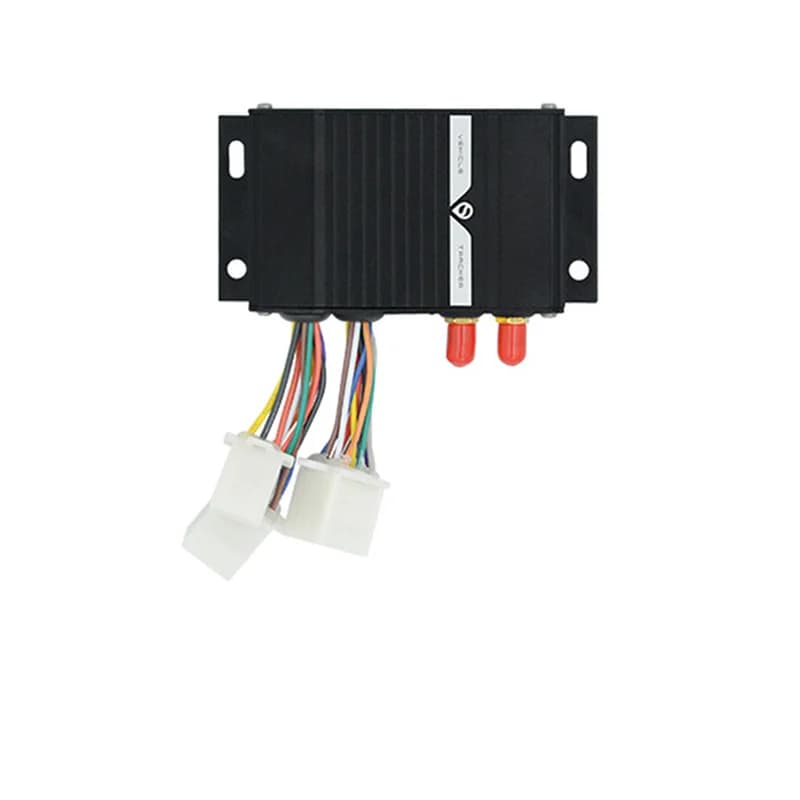
The SEEWORLD S208 GPS tracker is a wired 2G box made for working trucks and pickups. It sits behind the dash with two outside antennas, one for GPS and one for the mobile network. Wires on its plugs reach a fuel sensor, a relay, an SOS button and more. Send it one setup text and it reports to your own Fleet Scanner server, where each truck shows up live on the map.

2G GSM 850/900/1800/1900SiRF Star III GPS, 20 channelsRS232 fuel sensor, camera, i-ButtonPort 11817
SEEWORLD S208 GPS tracker, a black metal box with mounting ears, two red antenna sockets and coloured wires ending in white plugs
2outside antennas (GPS and GPRS)
-159 dBmGPS tracking sensitivity
9pins on the I/O cable
50 to 160 mAworking current
< 1 saverage hot start
sms · T / TE
Speed 64 km/hGSM ON
01 · Live tracking · GPS + GSM

A map link or a street address, sent back by text

Text T with the password and the S208 replies with a Google Maps link to where the truck is. Text TE instead and it replies with a written address, such as a street and city. SEEWORLD lists tracking by web, app and text, plus playback of past routes. When the truck drives out of GSM range, the tracker keeps its GPS points and sends them once the signal returns. Fleet Scanner draws every trip and keeps it for replay.

T Map link replyTE Address reply History playback Stored points sent later
Live vehicle tracking →
sms · CLOSE OIL
Oil circuit CLOSEDEngine off
02 · Remote cut-off · Relay wires

Shut off the fuel line of a stolen truck

A 12 V or 24 V relay is an option for the S208. On the 9-pin cable, the yellow wire is relay positive and the black one is relay negative, and the relay goes in the circuit of the engine or fuel control. Text CLOSE OIL with the password to shut the oil circuit and stop the engine. Text RESTORE OIL with the password to let it run again. In Fleet Scanner, keep this power for the people you trust most.

CLOSE OIL Shut the oil circuitRESTORE OIL Bring it back Relay 12 / 24 V (option)
Vehicle and equipment protection →
sms · C0 / C1
Fuel droppingTruck parked
03 · Fuel and temperature · CLS fuel sensor

See when the tank fills up or drains away

An 8-pin plug on the S208 takes a CLS fuel sensor, and the orange wire carries the oil level signal. With the sensor fitted, SEEWORLD lists fuel level change alarms and a mileage and fuel use report. Text C0 with the password for an alarm when fuel goes from low to high. Text C1 with the password for an alarm when it goes from high to low, which is how a siphon shows up. The same wires can take a temperature sensor instead. Fleet Scanner shows each fuel alarm in the alert list.

C0 Fuel rise alarmC1 Fuel drop alarm Fuel use report Temperature input
Fleet reports and dashboards →
alarm · SOSSOS
SOSMic live
04 · SOS and listen-in · SOS button + microphone

An emergency button and a way to hear the cab

The SOS button is an option that plugs into three wires on the 9-pin cable. Red is the SOS input, purple is its ground and brown runs the SOS light. A press sends the SOS alarm. Add the optional microphone and SEEWORLD lists voice monitoring: dial the SIM number in the tracker and it picks up on its own, so you hear what goes on in the truck. Fleet Scanner puts SOS alarms first so nobody misses them.

SOS input (red) SOS ground (purple) SOS light (brown) Voice monitoring
Fleet alerts management software →
sms · ARM / DISARMsleepmoving
Defence SETStart illegal
05 · Anti-theft · Door, start and shake

Guard the truck at night with one text

Text ARM with the password to set the defence. Text DISARM with the password to take it off. SEEWORLD lists an illegal door and illegal start alarm, a vibration alarm for odd shaking and a parking alarm. The white wire on the 9-pin cable is there to sense an illegal start. Fleet Scanner sends each of these to the people you choose, with the time and the place.

ARM Set defenceDISARM Remove defence Illegal door / start Vibration alarm Parking alarm
Trip planning and trip records →
rs232 · i-ButtonA3 41 9F 00
Driving too longDriver ID read
06 · Drivers · Alarms + RS232

Tired drivers, fast drivers and who sat at the wheel

The S208 has a fatigue driving alarm for long hours behind the wheel and an overspeed alarm. Through the 12-pin RS232 cable it can do more. An i-Button tool gives driver ID, so each trip ties to a person. A camera can take photos on its own. SEEWORLD marks these RS232 jobs as custom ones. In Fleet Scanner, these alarms feed into each driver’s record.

Fatigue driving alarm Overspeed alarm Driver ID (i-Button) Auto photo (camera)
Driver management software →
alarm · fence / power
Zone left yardPower cut
07 · Zones and power · Tracker + server

Zone alarms, plus a warning when the power is cut

SEEWORLD lists a geo-fence in and out alarm for the S208. It also gives a power off alarm, an over and low voltage alarm and protection against high and low voltage. The yellow wire on the power plug reads ACC, so you can tell when the key turns. In Fleet Scanner you can draw as many zones as you need, round a yard, a job site or a fuel stop.

Fence in / out Power off alarm Over / low voltage ACC (yellow wire)
Fleet geofencing software →

S208 specifications

Network2G GSM/GPRS, 850/900/1800/1900 MHz
PositioningGPS, SiRF Star III chip, L1 1575.42 MHz, 20 channels
GPS sensitivity-159 dBm tracking
Hot startUnder 1 s on average, open sky
AntennasOutside GPS antenna and outside GPRS antenna
DataUDP by default, TCP as a custom option; SMS
Working current50 to 160 mA
Cables3-pin power, 9-pin I/O, 12-pin RS232 adapter
In the boxCables, GPS and GPRS antennas, hook and loop pads
OptionsRelay (12 or 24 V), SOS button, microphone, CLS fuel sensor, camera, i-Button
LightsRed for power, green for GSM signal
EnvironmentWorks at -20 to 70 °C, stored at -30 to 85 °C
CasingIPX7 dust, water and fire proof design (product page)
Fleet Scanner port11817

Specifications can differ between hardware revisions. Check the manufacturer’s datasheet for your exact unit.

How to connect the S208 to Fleet Scanner

  1. Get a 2G SIM with GPRS data and SMS, and write down its phone number and the plate of the truck it goes in. With the power off, open the S208 housing, put the SIM in its slot the right way round and close it again. SEEWORLD warns that putting in or taking out the SIM with the power on can damage the card.
  2. Test the full set on a bench first. Then wire it in the truck. On the 3-pin power plug, red goes to battery positive, black to negative and yellow to the ACC (ignition) line. Hook up the antennas, ACC, SOS button and fuel sensor before the power wire goes to the battery. Hide the box, keep it away from reversing radar and other anti-theft gear, and fix it firmly so shaking cannot harm it.
  3. Place the antennas where metal and coated glass will not cover them, such as behind the dashboard plastic or the trunk trim. Then send the setup text: SS,*APN*,**,**,*IP*,*Port*,*System number*,*Phone number*,*123456*. Put your SIM’s APN, your Fleet Scanner server IP, 11817 as the port, the 11-digit system number from the serial sticker (it starts with 13) and your own phone number. 123456 is the factory password.
  4. Wait for the reply. It starts with OK! and lists the data channel, APN, server IP, port and driver ID, so you can check each one. Add the tracker in Fleet Scanner with its system number, take a short drive, then text T with the password to compare the map link with the live map.

SEEWORLD S208 FAQ

How do I connect the SEEWORLD S208 to my own tracking server?

Use the SS text from the user guide. It holds the APN, the server IP, the port, the system number, your phone number and the password, all in one message. Put your Fleet Scanner IP and port 11817 in it. Without this, the tracker is meant for SEEWORLD’s own justrack platform.

What SMS commands does the S208 GPS tracker use?

Each one is a word, a comma, then the password between stars, like ARM,*123456*. The list has SS for setup, T and TE for location, CLOSE OIL and RESTORE OIL for the fuel cut, ARM and DISARM for the defence, C0 and C1 for fuel alarms, and PE and PN to turn the SMS roll call on or off. WWW.CXGPS.COM resets the factory password. The guide has no text for the report gap.

What can the S208 track on a truck?

Position and route history from GPS, the key state from the ACC wire, SOS presses, power cuts, voltage alarms, overspeed, long driving, parking, shaking and illegal door or start. With add-ons it also gives fuel level alarms, fuel use, temperature, driver ID and camera photos.

How long does the SEEWORLD S208 run on battery?

SEEWORLD does not give a battery size or a number of hours for the S208. It is a wired tracker that runs on the truck’s own power and draws 50 to 160 mA while working. If someone cuts that power, it sends a power off alarm.

What is the difference between the S208 and the S308?

SEEWORLD covers both in one user guide. The S208 is the 2G GSM/GPRS model and sends over UDP by default. The S308 is the 3G WCDMA model, sends over TCP by default and takes a wider voltage range. The wiring and SMS commands are the same.

Is the S208 still sold, and is it 4G?

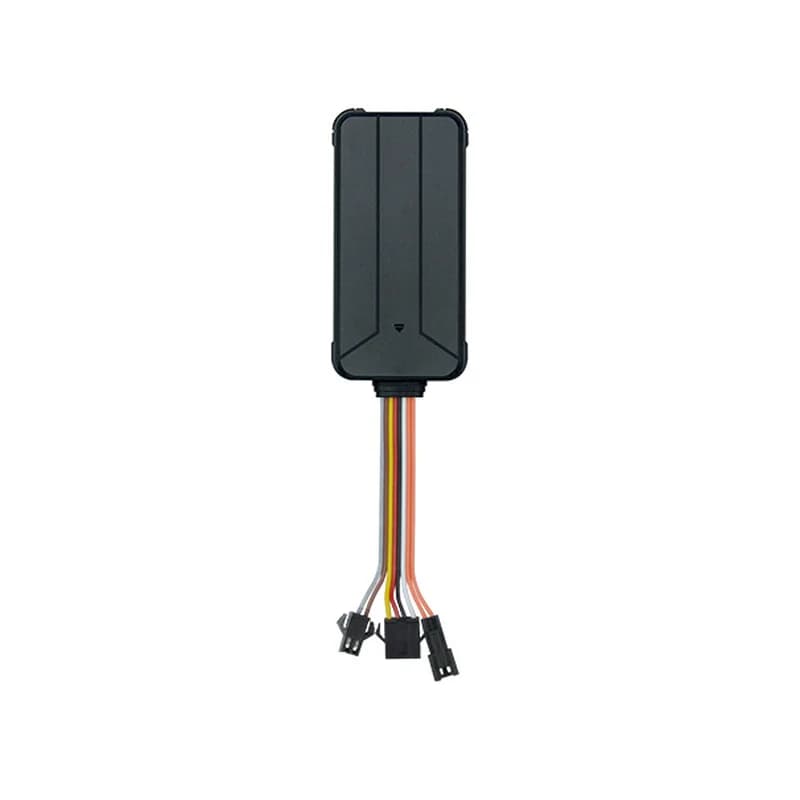
Yes, it is still listed on seeworld.com with its user manual in the download centre. SEEWORLD sells it as a 2G tracker, and the user guide says 2G too, even though one line of the page’s parameter table reads 4G Cat 1. SEEWORLD lists a separate 4G truck tracker, the S208L. Check that 2G still works where your trucks drive.

S208 in the cab. Every truck on your own server.

From a single tracker to a mixed fleet across 1,000+ device models: live tracking, alerts, fuel, drivers, maintenance and reports in one self-hosted platform. See it with your own hardware.

Get a free demo

More supported GPS trackers

Specs, wiring and SMS commands come from SEEWORLD’s S208 product page on seeworld.com and the S208-2G / S308-3G user guide it links. Where the page and the guide disagree (size, weight, satellite systems, start time, memory), the item is left out. SEEWORLD is a trademark of Shenzhen SEEWORLD Technology.

Take Control with
Fleet Tracking

Track vehicles in real time, optimize routes, and take full control of your fleet operations.

Free Demo